
"Free ASO tool" is what people search when they have an app, no budget, and a nagging feeling that the keyword work is not getting done. The honest answer is that more app store optimization can be done for nothing than most people expect, because the stores publish most of the raw signals themselves. Where it gets hard is volume, and the amount of manual work you are willing to repeat every single week.
This guide covers what is free, a keyword workflow built on free inputs, what ASOClimb's free plan adds on top, and the point where paying starts to save more than it costs.
What the stores give you for nothing
Before any third-party tool, four sources cost nothing and sit closer to the truth than anything modeled.
App Store Connect analytics. For your own app, Apple reports impressions, product page views, conversion rate, first-time downloads and redownloads, plus a Sources view of how people found you. The analytics dashboard help page defines each metric. These are exact. No estimate beats them for your own app.
Apple Ads keyword popularity. When you set up a campaign in Apple Ads, keyword recommendations carry a search popularity score "from 1 to 5, with 5 being the most popular", per Apple's recommendations page. You never have to run the campaign. The scale is coarse, but it is Apple's own reading of search demand and the only one that exists.
Google Play Console. On Android, the store listing performance reports show where visitors came from, down to the search term they used before landing on your listing, as described in the Play Console help. Google notes a change in mid-2026 to measuring clicks rather than acquisitions, so read the definitions on the page you are using.
Store autocomplete and top charts. Type a seed term into the App Store or Google Play search box and you get the suggestions the store thinks people want. The top charts, by category and country, show who is winning downloads and revenue right now. All public. All unrecorded: nothing you see today is kept for you tomorrow unless you write it down.
What none of these give you is a competitor's keyword ranks, a competitor's search traffic, or a history. That gap is the reason every ASO tool, paid or free, exists.
A free keyword workflow, step by step
The first pass takes about an hour. After that, maybe twenty minutes a week. A spreadsheet is enough.
- Write ten seed terms. Describe what the app does in the words a user would type, not the words on your landing page. A sleep-tracking app might start with "sleep tracker", "sleep sounds", "snore recorder", "bedtime".
- Expand with autocomplete. Type each seed into the store search box on a device set to your target country and record every suggestion. Then append a letter ("sleep tracker a", "sleep tracker b") to pull more. Expect 60 to 120 candidates.
- Score demand with Apple Ads. Paste the list into a draft Apple Ads campaign and note the 1-to-5 popularity for each. Drop anything at 1 unless it is unusually specific to your app.
- Check who ranks. Search each remaining term in the store and record the top five apps. Big established names, or small ones? That is a rough difficulty read, and what a keyword difficulty score can and cannot tell you explains why it stays rough.
- Choose, then write. Pick terms that are relevant first, in demand second, winnable third, and place them in the title, subtitle and keyword field on iOS, or the title, short description and long description on Android. The practical App Store keyword research workflow goes deeper on the ordering.
- Record ranks weekly. Search each term, find your app, note its position and the date. Same day each week, same country, on a device not signed in to your own account.
Step six is where the free method breaks, and it breaks slowly. Twenty keywords across two countries is forty searches a week. I have watched this happen more than once: within a month most people stop, and the one thing ASO needs most, a dated history of ranks, is the thing that stops being collected.
What ASOClimb's free plan includes
ASOClimb's Free plan costs $0, needs no card and includes every feature in the product. What separates it from Pro is how much you can run through it each month. As of the pricing page, the Free limits are:
| Allowance | Free | Pro |
|---|---|---|
| Apps (App Store or Google Play listings) | 1 | 50 |
| Tracked keywords, observed daily | 25 | 1,500 |
| Competitors | 5 | 200 |
| Keyword inspections a month | 25 | Unlimited |
| Niche analyses a month | 3 | Unlimited |
| Autocomplete runs a month | 25 | Unlimited |
| CSV and PDF exports a month | 3 | Unlimited |
| Rank alert rules | 3 | 100 |
| API and MCP requests a month | 500 | 50,000 |
Monthly allowances reset on the first of each month, UTC. Pro is $10 a month or $100 a year.
In practice the free plan takes over the manual parts of the workflow above for one app. The 25 tracked keywords are observed daily rather than whenever you remember, so step six happens without you. Autocomplete runs do step two in one request and keep the output. Keyword inspections show who ranks for a term and how it has moved. Five competitor slots cover the apps you found in step four. Revenue and download estimates for apps on the top charts are in there too, which is enough to size a niche before you commit to it.
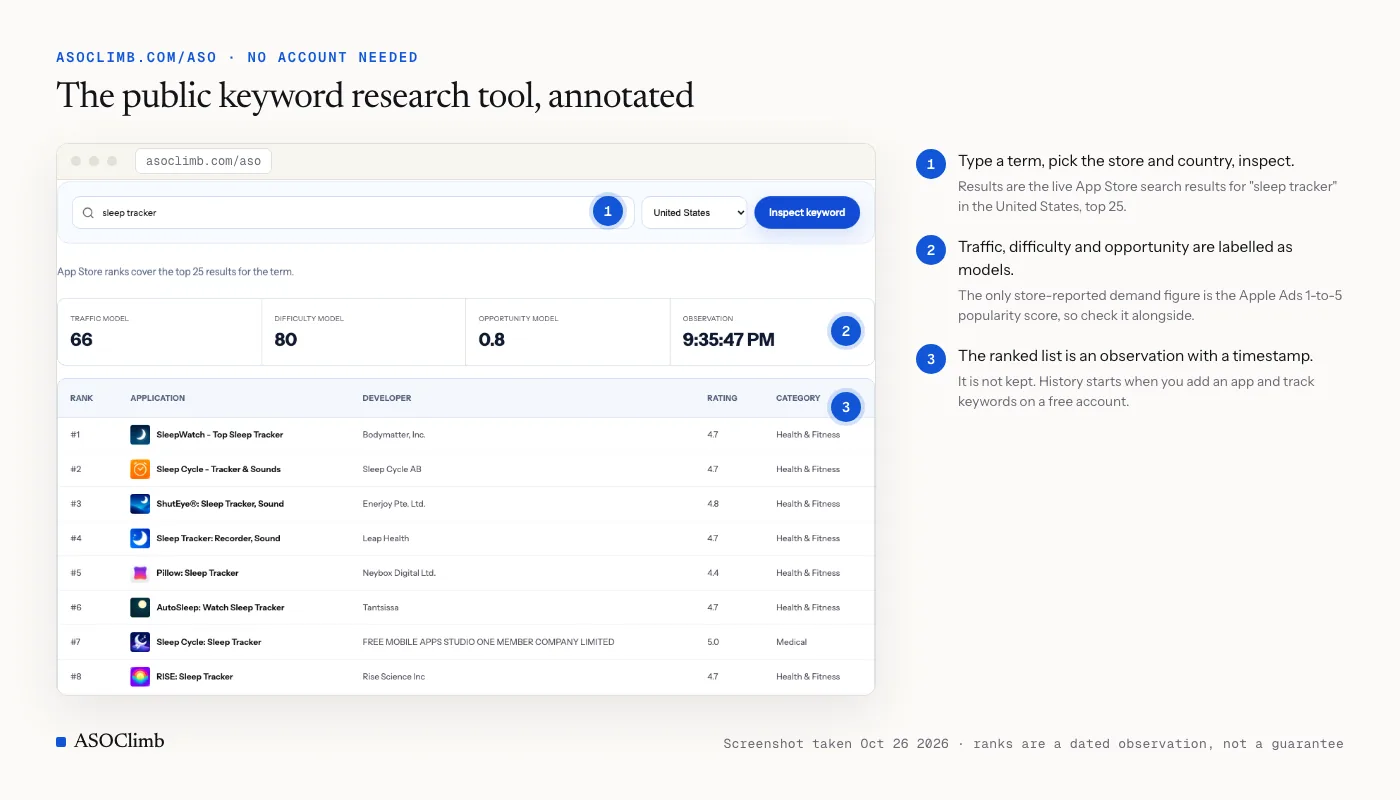
Three limits are worth knowing before you start. Traffic, difficulty and opportunity scores in ASOClimb are models, not store-reported search volume; the only store-reported demand figure is the Apple Ads 1-to-5 score, and it stays worth checking alongside. Keyword ranks are dated observations for a store and country, not a promise that a user will see the same result. And the public keyword research tool at /aso works without an account but keeps no history; tracking starts when you add an app.
Where the free plan runs out
The free plan is built for one app at a modest pace, and the ceiling arrives in predictable ways.
- A second app. The plan covers one listing. Two apps, or one app on both stores, is the most common reason people upgrade, because the second listing cannot be tracked at all on Free.
- More than 25 keywords. Twenty-five is enough for a focused app in one country. It is not enough for an app in three languages, or a category with forty plausible terms. Once you start rotating keywords in and out of the tracked set, the history you are building has holes in it.
- Research in bursts. Twenty-five inspections and three niche analyses a month support steady work. They do not support a week of research before a metadata update, when you might want to inspect sixty terms in two days.
- Exports and alerts. Three exports and three alert rules a month are fine for a solo developer. A team that reports to someone else, or needs an alert per key term, will blow through them.
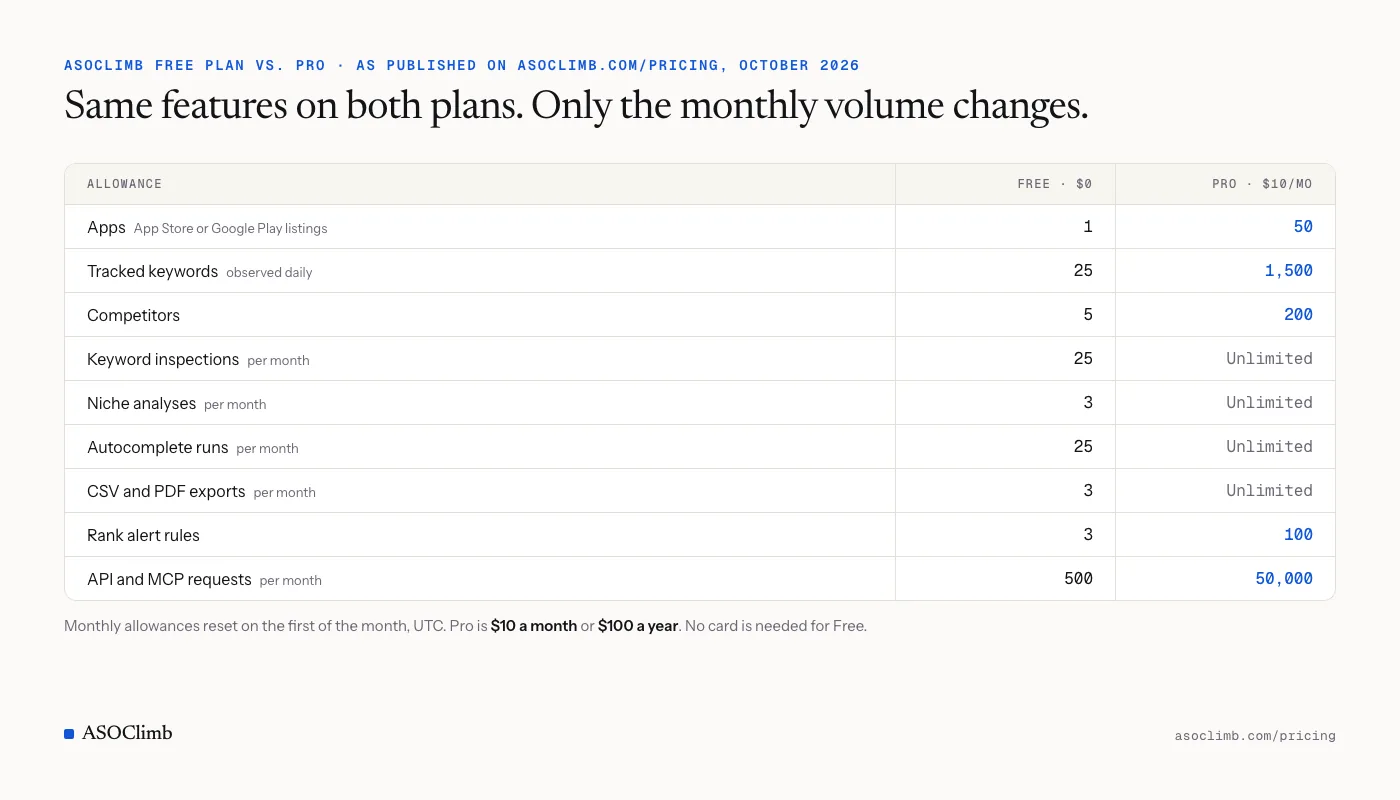
If none of that describes you, stay on Free. The data is identical on both plans; the model behind a rank or an estimate does not get better when you pay. What changes is volume and the number of apps.
When upgrading pays for itself
One way to decide: count the hours the free workflow costs you each month and compare them with $10. For most people doing weekly manual rank checks on more than one app, the arithmetic settles itself by the second month. For a single app with a stable keyword set it may never settle, and that is a fine outcome.
Two signals say it is time. First, you have a question the free limits will not let you answer this month, like inspecting the full keyword set of a competitor that just overtook you. Second, you have stopped recording something you used to record because the manual version got tedious. Gaps in rank history cost you later, because the one thing you cannot buy is observations from last month. Keyword rank tracking without fooling yourself covers what a usable history needs to contain.
Start with the free inputs
Whatever tool you end up with, begin with the store's own data: App Store Connect or Play Console numbers for conversion, Apple Ads popularity for demand, autocomplete and top charts for the landscape. Then pick one app, add it to a free ASOClimb account, track the 25 terms that matter most, and let the daily observations pile up. If the limits stop being enough, you will know exactly which one, and that is the right moment to decide about paying.