
When you type into App Store search, the store suggests completions. App Store search suggestions are among the few free, public signals about what people actually type. This guide covers how to use them, what they can and can't tell you, and how to turn them into a keyword shortlist. It is one part of a wider App Store keyword research workflow.
What App Store search suggestions are
Apple calls them search hints. Its App Store search guidance, checked on 1 November 2026, says search hints "appear once someone inputs text into the search bar and can help inspire people before they search or select a result". Google Play's search box suggests completions as you type, too. Neither Apple nor Google documents how suggestions are chosen or ordered.
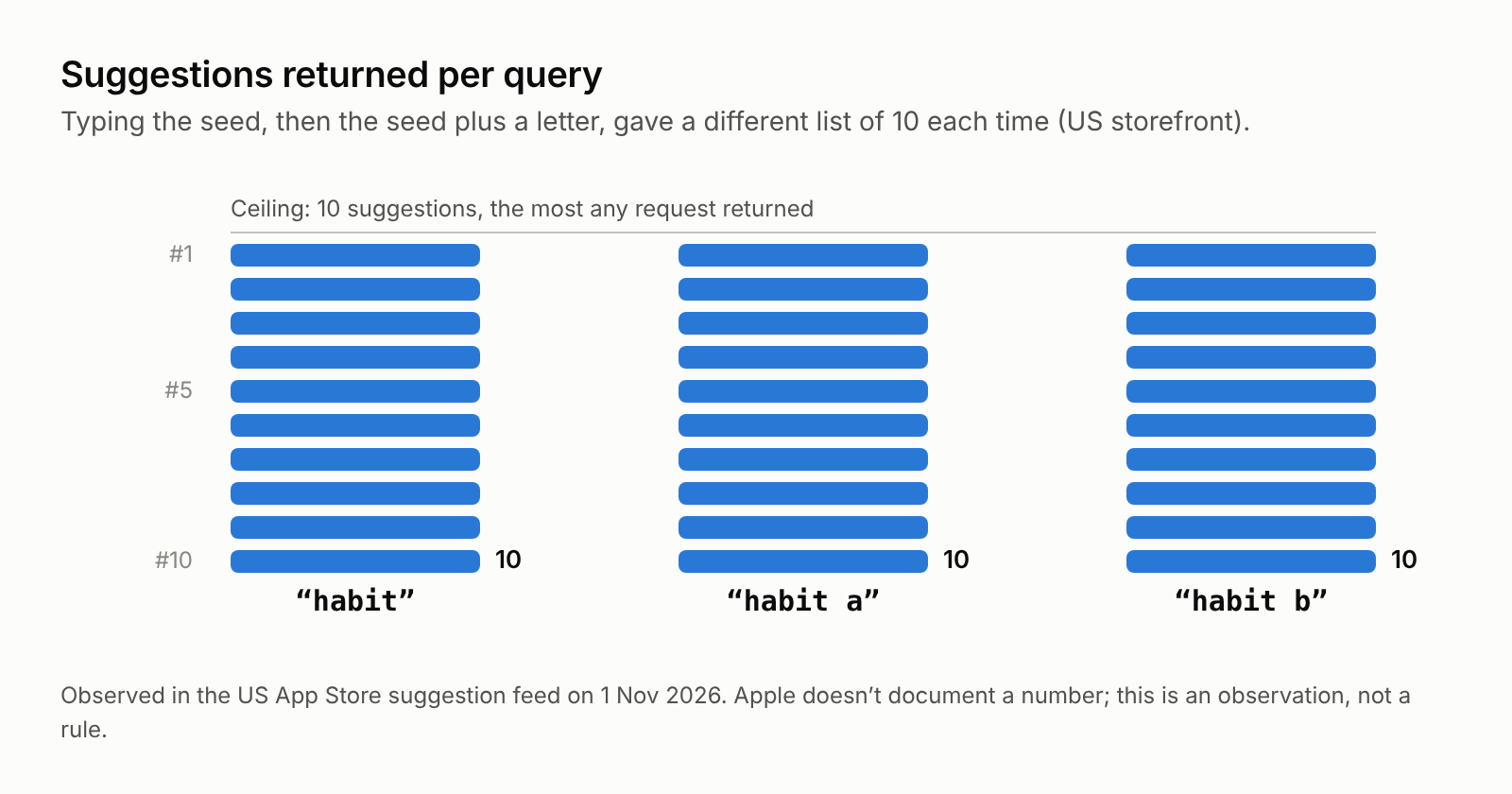
Suggestions change as you type, and they differ by country. On 1 November 2026 we read the suggestion feed the App Store uses as you type, which Apple doesn't document for developers, for a handful of terms such as "calorie", "habit", "budget" and "photo" in the US and German storefronts. No request returned more than 10 suggestions, and most returned exactly 10. In the German storefront, the German word "kalorien" returned German phrases such as "kalorien zähler" and "kalorienzähler kostenlos", while the English word "calorie" returned a mix that included "calorie tracker kostenlos".
What suggestions don't include: a search volume number. In those responses, each suggestion carried only the term and a link to its search results, with no popularity figure. Any "volume" a tool shows from suggestions is an estimate built on top of them.
What suggestions can tell you
- People search this phrase. A suggestion is a good hint that the phrase is a real search, not something a marketer invented.
- The words people use. In our US check, "calorie" brought up both "calorie tracker" and "calorie counter". A local-language term versus the English one is the same kind of choice; our guide to localizing App Store keywords covers that.
- Long-tail ideas. Suggestions such as "calorie tracker free", "calorie deficit tracker" or, in Germany, "kalorien tracker kostenlos" show modifiers worth checking.
- A rough sense of demand, as a model. ASOClimb's popularity model treats a term that is suggested after fewer typed letters, and higher in the list, as stronger evidence. The keyword score methodology publishes the formula. Apple doesn't publish how suggestions are ranked, so any demand reading from them is a model, not a measurement.
What suggestions can't tell you
- An exact number of searches
- Whether you can rank (that depends on the apps already ranking)
- Whether the term fits your app (only you can decide that)
- Whether a suggestion is a generic term or another app's name: many suggestions are app names
A simple process for App Store search suggestions
1. Start with 5 to 10 seed words that describe what your app does: the function ("budget"), the outcome ("save money"), and the audience ("for couples").
2. Type each seed and note the suggestions. Then try the seed followed by a space, and the seed followed by single letters (a, b, c and so on). In our US check, "habit", "habit a" and "habit b" each returned a different list of 10. Do this in each country you care about.
3. Remove irrelevant terms. Drop competitor brand names: Apple lists competing app names among improper keywords, and App Store Connect Help says names of other apps or companies aren't allowed. Brand names turn up in suggestions often; several of the "habit" suggestions were names of existing apps. Drop terms that don't describe your app.
4. Check difficulty. Search each remaining term and look at the top 10 results:
- Do they have huge rating counts?
- Do they all have the exact phrase in their name?
If both are true, it's a hard term for a new app. Our guide to ASO keyword difficulty goes deeper.
5. Shortlist. Keep terms that are relevant, appear in suggestions, and have beatable top results.
6. Place them.
- App Store: put the strongest phrase in the name (30 characters), the next in the subtitle (30), and the rest in the keyword field (100, comma separated, no spaces).
- Google Play: use them naturally in the title (30), short description (80) and full description (4,000). There is no keyword field.
7. Track the ranks weekly after the update, and judge the trend over several weeks.
Doing this at scale
The manual method works, but it's slow. Ten seeds, four variations each, in three countries is already 120 lookups before you have checked a single search result. That's why ASO tools automate it.
ASOClimb Wow Keywords does it on our servers:
- In each country you pick, it asks the store's own autocomplete what people type after the first letters of each term, and leaves out terms that name a competitor's brand.
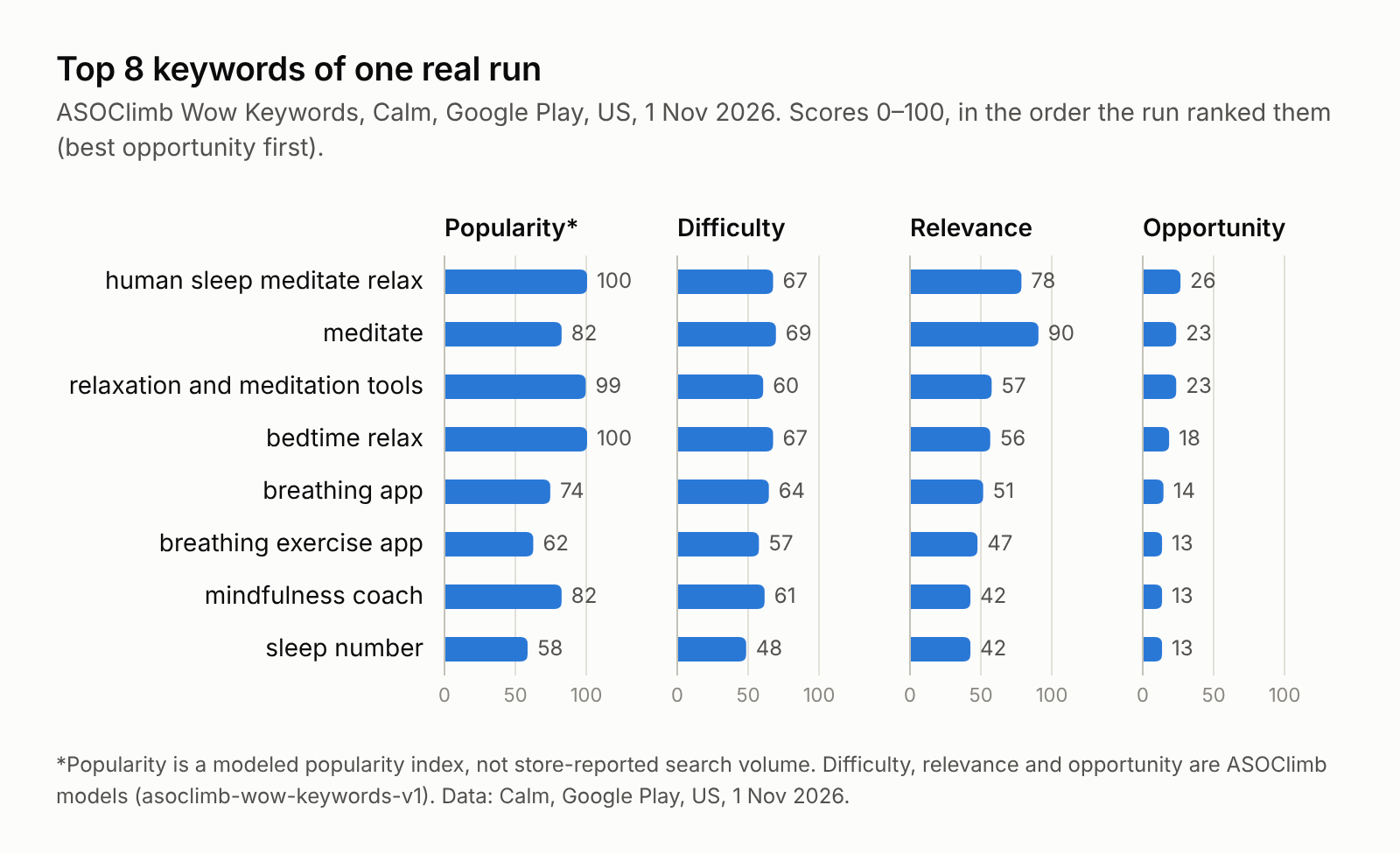
- It runs a store search for the most promising candidates in each country and models popularity, difficulty, relevance and opportunity from 0 to 100. The formulas are public, and the scores are labelled models, not store data.
- It writes three listing variants: a title, subtitle and keyword field on the App Store, or a title and short description on Google Play.
Here is that scoring for the top eight keywords of one real run, for Calm on Google Play in the US on 1 November 2026:
You don't need your own AI account or API keys. The Free plan includes one full run a month for one app and up to 3 countries. To check a single keyword first, the free keyword checker needs no signup.
FAQ
Do App Store search suggestions show search volume? No. When we read them on 1 November 2026, each suggestion had a term and a link, with no volume figure.
How many suggestions does the App Store show? In our 1 November 2026 check, no request returned more than 10, and most returned exactly 10. Apple doesn't document a number, so treat that as an observation, not a rule.
Are suggestions different by country? Yes. In our check, the German storefront returned German phrases for a German query, and a different mix for the same English query.
Is a suggested term always worth targeting? No. It also has to be relevant to your app, and the apps already ranking have to be beatable.
Should I include competitor names that appear in suggestions? No. Apple lists competing app names among improper keywords for the keyword field.