Most ASO work is a loop of small questions. Which of my keywords moved this week? Who ranks for this term in Germany? What does my competitor rank for that I don't? Does this subtitle still fit in 30 characters? Each answer usually means opening a dashboard, filtering a table and copying numbers into a doc.
An ASO MCP server lets you ask those questions in plain language inside Claude or Grok, and get answers from real App Store and Google Play data instead of the model's memory. This guide explains what that means, how to connect ASOClimb in a few minutes, and a practical workflow you can run every week.
What an ASO MCP server actually is
MCP (Model Context Protocol) is an open standard that lets an AI assistant call outside tools. An MCP server publishes a list of tools with clear inputs, and the assistant decides when to call them during a conversation.
Without a connector, asking Claude "what's the keyword difficulty of habit tracker in the US App Store?" gets you a guess. The model has no live store access, so any number it gives is made up. With an ASO MCP server connected, the assistant calls a tool such as inspect_keyword, the server checks the store, and the answer comes back with real top apps, ratings and scores.
ASOClimb runs a remote MCP server at https://asoclimb.com/mcp. Every tool is a thin wrapper over the same routes the ASOClimb web app uses, so results, plan limits and labels are the same whether you ask in the app or in a chat. Rankings and listing facts come from storefront observations; traffic, difficulty, KEI, visibility and opportunity scores are models, and every response labels them that way.
What you can do from a chat
The server exposes 49 tools. Here are the ones you'll use most, grouped by job:
- Keyword research:
inspect_keyword,run_autocomplete,discover_keywords,list_keyword_opportunitiesandscore_keyword_explain(which breaks a score into its parts). - Rank tracking:
list_keywords,track_keywordsandget_keyword_rank_history. - Competitors:
add_competitor,get_competitor_keywords,get_keyword_gapandexpand_keyword_gap. - Market research:
top_charts,new_releases,search_storeandrun_niche_analysis. - Listing writing:
get_metadata,check_listing_metadata,simulate_metadata,save_metadata_draftandcompare_metadata_draft. - Wow Keywords:
wow_keywords_run,wow_keywords_get,wow_keywords_apply_draftandwow_keywords_report.
Typical requests look like this:
- "Which of my tracked keywords moved this week?"
- "Inspect the keyword habit tracker in the US App Store."
- "Show the top free Productivity apps in Germany."
- "What is the keyword gap between my app and this competitor?"
- "Analyse the niche sleep sounds on Google Play."
You can see the full tool list on the ASOClimb MCP docs page.
How to connect ASOClimb to Claude (step by step)
Claude connects through OAuth: you sign in to ASOClimb and approve the workspace, and you never paste a key. Custom connectors work on every Claude plan, and the Free plan allows one (Anthropic's custom connector guide).
- In Claude, open Customize → Connectors, click + Add, then Add custom connector. On Team and Enterprise plans, an owner adds it under Organization settings → Connectors first.
- Name it ASOClimb, enter the server URL
https://asoclimb.com/mcpand click Continue. - Under Authentication choose Sign in now; under OAuth client choose Register automatically. Click Add.
- Sign in to ASOClimb with Google or Apple if asked, choose whether to allow write access, and click Allow.
That's it. Read-only tools run without a prompt; tools that change your workspace or spend allowance ask you first.
Claude Code works the same way from the terminal. Add the server once:
claude mcp add --transport http asoclimb https://asoclimb.com/mcpThen type /mcp inside Claude Code to sign in.
How to connect it to Grok
Grok accepts custom MCP connectors on grok.com and completes the server's OAuth sign-in.
- Open grok.com/connectors, click New Connector and select Custom.
- Enter
https://asoclimb.com/mcp, sign in to ASOClimb on the approval page and click Allow.
On Grok Business and Enterprise, a team admin provisions the connector first (xAI's connectors docs).
ChatGPT, Cursor and Codex support are marked as coming soon on the docs page. If your client sends fixed headers instead of OAuth, you can use a workspace API key from Account → Developer in ASOClimb (a key can be read-only). ASOClimb is also published in the official MCP Registry as com.asoclimb/aso, so clients that browse the registry can install it by name.
Read vs write: what you're approving
Each connection is scoped to one workspace and one of two permission levels, which you pick on the approval page:
- workspace:read lets the assistant read your tracked apps, keywords, ranks and history, saved inspections, competitors, charts and usage.
- workspace:write also lets it track or untrack apps and keywords, add competitors, and run keyword inspections, autocomplete and niche analyses. These are the live checks that count against your plan's monthly allowance.
Each tool call is one API request against your plan's monthly API allowance, the same as a request with an API key. Protocol traffic like listing tools is free. You can see usage per connection, and disconnect any connection, under Account → Developer.
If you just want to explore, start with read-only. Turn on write when you want the assistant to run fresh store checks or save drafts for you.
A weekly ASO workflow you can run in one chat
Here's a routine that replaces a lot of tab-switching. Run it once a week for each app.
1. Check what moved
Ask: "Which of my tracked keywords moved this week, up or down? Show the biggest changes first."
The assistant reads your rank history and returns the changes. Rank data comes from real storefront observations, so this is the most reliable part of the report. If you're not tracking anything yet, add your app in the ASOClimb app first, or ask the assistant to track a short list for you (that's a write action, so it will ask).
2. Find the gap against one competitor
Ask: "What's the keyword gap between my app and [competitor] in the US App Store? Only show terms where they rank in the top 10 and I don't rank."
get_keyword_gap compares the two keyword sets. This is usually where the best new targets come from, because a competitor ranking well proves the term is reachable for an app like yours. We walk through this in more detail in our competitor keyword gap guide.
3. Check the candidates properly
For the three to five most promising terms, ask: "Inspect each of these keywords in the US App Store and explain the difficulty score part by part."
inspect_keyword returns the top apps for the term, and score_keyword_explain breaks the scores down. In ASOClimb's Wow Keywords model, difficulty combines the ratings of top apps, how many of them put the term in their title, listing quality and big-publisher presence. Popularity, difficulty, relevance and opportunity are modeled 0 to 100 indexes, not store-reported search volume, and the assistant will say so. If you want the reasoning behind the scores, read how ASOClimb calculates keyword scores or our explainer on keyword difficulty.
4. Draft new metadata that fits the limits
Ask: "Using my current listing and the two best new terms, write a new title, subtitle and keyword field. Check them against App Store limits and save the best one as a draft."
get_metadata reads your live listing, check_listing_metadata checks character counts and rule problems, and save_metadata_draft saves it. A draft is only a draft: nothing is published to the App Store or Google Play. You still paste the final text into App Store Connect or the Play Console yourself.
If you'd rather start from your app than from a keyword list, run Wow Keywords: "Run ASOClimb Wow Keywords for my app in the US, Germany and Japan, then show me the three variants with the most coverage." It gathers candidates per country from your listing, competitors and store suggestions, scores them and writes listing variants that fit each store's limits. You can read more on the Wow Keywords page.
5. Measure next week
After you ship the new metadata, ask: "How did my Wow Keywords terms move since I applied the draft?" wow_keywords_report compares ranks against the baseline it saved when you applied the variant, and lists new top-10 terms and terms that dropped out.
A real example from the docs
The ASOClimb docs show a dated, real run: Wow Keywords for Calm (com.calm.android) on Google Play in the US, made on 1 November 2026. The term meditate scored 82 on popularity, 69 on difficulty and 90 on relevance, which gives an opportunity of 82 × (100 − 69) / 100 × 90 / 100 = 22.9, shown as 23. One rule-based variant suggested the title "Calm: Meditate & Bedtime Relax" (30 of 30 characters) and a 73-character short description, raising the run's modeled coverage from 9.5 to 23.
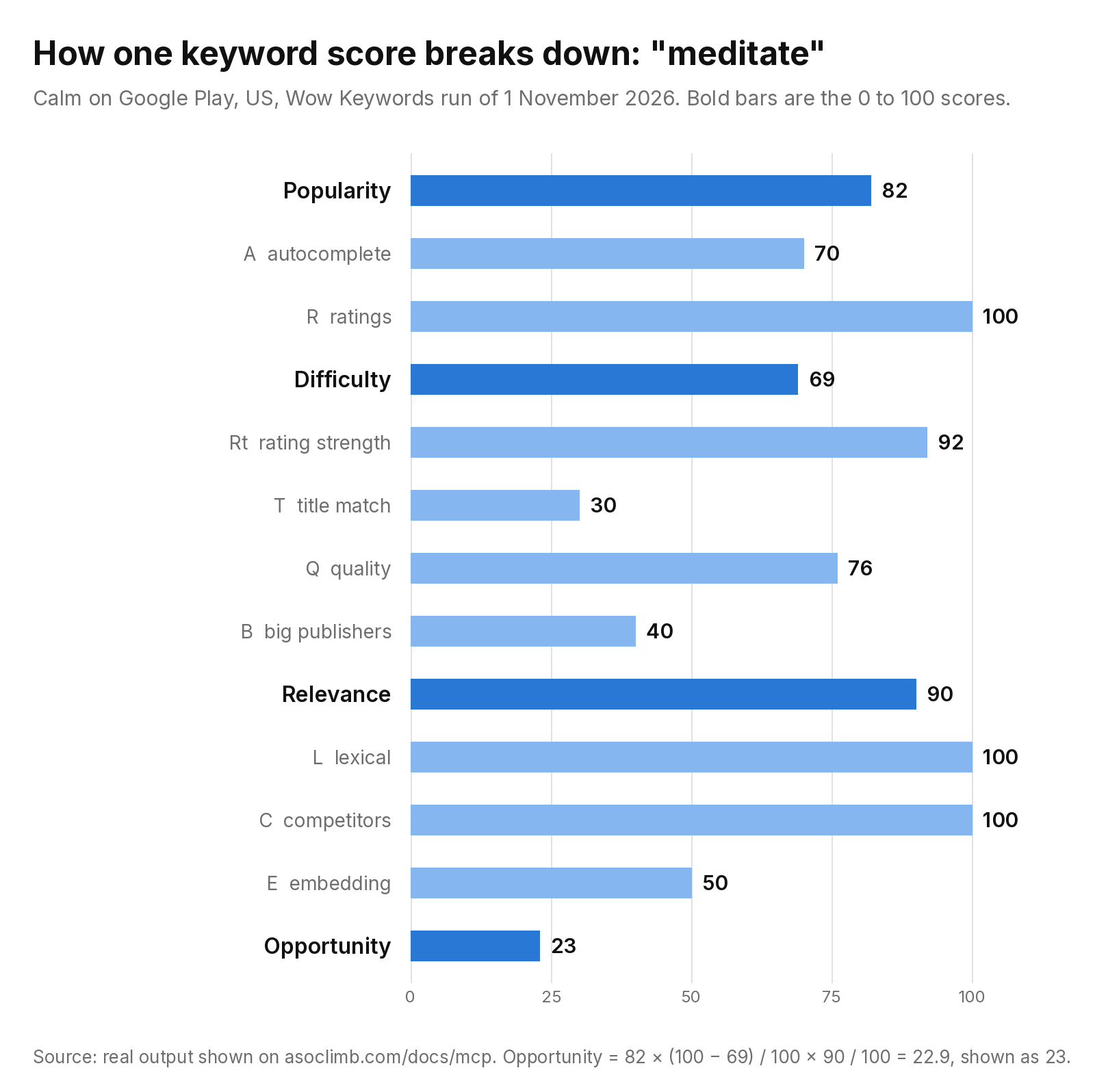
The point isn't that number on its own. It's that every score in the chat can be traced back to its parts, so you can disagree with it, and you can see exactly which top apps you'd be competing with.
Tips for getting reliable answers
- Name the store and country every time. "Habit tracker in the US App Store" gets better answers than "habit tracker".
- Ask for the source. Ask the assistant whether a number is an observed rank or a modeled score. ASOClimb labels both, so it can tell you.
- Keep write access off until you need it. Read-only covers reporting, gap checks and reading drafts.
- Watch your allowance. Every tool call counts as one API request. A five-keyword inspection is several calls, so batch questions instead of asking one keyword at a time.
- Don't let the model invent volume. If an answer includes a search volume figure that didn't come from a tool, ask where it came from.
FAQ
What is an ASO MCP server? It's a server that gives an AI assistant tools for App Store Optimization through the Model Context Protocol. Instead of guessing, the assistant calls tools that check real App Store and Google Play data, such as keyword rankings, top apps and listing metadata.
Can Claude do keyword research for the App Store? Not on its own, because it has no live store access. Once you connect an ASO MCP server like ASOClimb, Claude can inspect keywords, read rank history, compare competitors and check metadata against store limits using real data.
Is the ASOClimb MCP connector free? You can connect it on ASOClimb's Free plan. Each tool call counts against your plan's monthly API allowance, and Wow Keywords on Free includes 1 run a month with up to 3 countries per run (Pro includes 20 runs a month). See pricing for current limits.
Does it work with ChatGPT? ChatGPT support is listed as coming soon on the MCP docs page. Claude, Claude Code and Grok work today.
Can the assistant change my live App Store listing? No. The most it can do is save a metadata draft inside ASOClimb. Publishing still happens in App Store Connect or the Google Play Console.
Are the keyword scores real search volume? No. Apple and Google don't publish search volume. Popularity, difficulty, relevance and opportunity are modeled 0 to 100 indexes, and ASOClimb labels them as models in every response. Ranks and listing facts are observed directly from the stores.
Try it
Create a free ASOClimb account, add your app, then connect https://asoclimb.com/mcp in Claude or Grok and ask which of your keywords moved this week. Want to try keyword checks first without connecting anything? Use the free keyword checker.