
Apple now lets a custom product page show up in App Store search, and most of the advice I read about custom product page keywords is written for teams with 20 pages and an Apple Ads budget. A small app does not need 70 pages. It needs about three, each one matched to a search intent that really is different from the others. This post shows how I would pick those three themes from real search results, split the keywords between them and measure whether the pages earn their keep.
I use one worked example the whole way through: a gym workout app in the US App Store, using results ASOClimb observed on 2 November 2026.
What Apple actually changed
Custom product pages are extra versions of your App Store page with their own screenshots, app previews and promotional text. Until 2025 people only saw them through a link, usually from ads. Apple then added keywords. Here is what the App Store Connect help page on custom product pages says today:
- You can create up to 70 custom product pages per app.
- You assign keywords to a page from your latest approved app version. You pick from that list. You cannot type a new word.
- When someone searches one of those keywords, they see that page instead of your default page.
- Keywords are set per localization, so each language needs its own selection.
- The page only shows in search once it is approved and set to visible.
- Apple's tip is to give each page a unique set of keywords.
In its WWDC25 session on App Store Connect, Apple also said that if you are only assigning keywords, the change can go live without a new review. New screenshots on a page still go through review.
The part people miss: assigning a keyword to a page will not make you rank for anything new, and nowhere in its docs does Apple claim a page lifts your position. Your title, subtitle and keyword field still decide where you appear. The page only changes what the searcher sees after you appear. So this is a conversion tool that happens to sit inside search.
Why three themes for your custom product page keywords, not ten
Every page you add is screenshots to design, localizations to fill and numbers to read. A solo developer can keep three pages fresh. Ten pages turn into ten stale pages after the next redesign.
There is also a data reason. Apple's analytics only show figures for a custom page after it gets at least five first time downloads, according to the App Store Connect Analytics help page. If your app gets 40 search downloads a day and you split them over ten pages, several pages will sit under that line for days, and the rest will show numbers too small to trust. Three pages on your three biggest themes keep each one big enough to read.
Step 1: find themes where the search results really differ
A theme is not a keyword. A theme is a group of searches where people want the same thing and see roughly the same apps. The quickest test I know is to compare the top 10 results of two keywords. If most of the apps are the same, the searchers want the same thing and one page can serve both. If the lists barely overlap, those are different crowds and they deserve different screenshots.
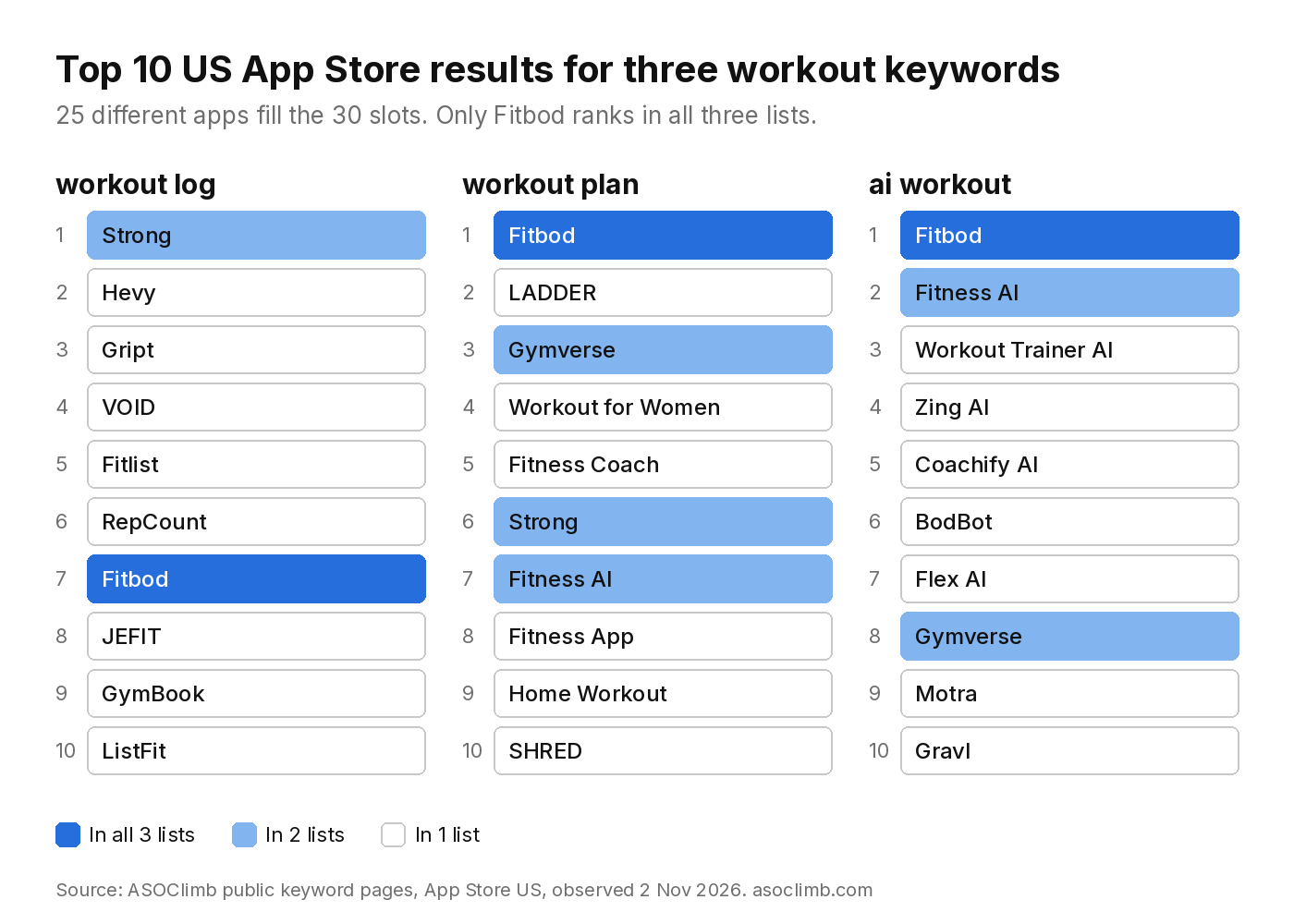
I ran this on four workout keywords. All rankings below are from ASOClimb's public keyword pages for the US App Store, observed 2 November 2026.
What the workout results showed
- workout log and workout plan share only 2 apps in their top 10 (Fitbod and Strong).
- workout log and ai workout share 1 app (Fitbod).
- workout plan and ai workout share 3 (Fitbod, Fitness AI and Gymverse).
- Across those three lists there are 30 top 10 slots and 25 different apps. Fitbod is the only app in all three.
- gym workout and workout plan share 8 of their top 10. Those two are the same theme.
So the searches look similar on paper but they are three different crowds. The workout log list is full of tracking apps: Strong at 1, Hevy at 2, then Gript, VOID and Fitlist. The workout plan list leads with Fitbod, LADDER and Gymverse, apps that tell you what to do. The ai workout list is mostly apps with AI in the name, like Zing AI, Coachify AI and BodBot.
A quick overlap rule
For contrast, I checked a nutrition pair. calorie tracker and calorie counter share 7 of their top 10, so one page covers both. calorie tracker and ai calorie tracker share only 4, which makes the AI version a separate theme there too.
My rough rule: 6 or more shared apps in the top 10 means one theme. 4 or fewer means two themes. In between, look at the screenshots of the top apps and decide which story they tell.
You can do this by hand by searching each keyword on a phone and writing down the top 10. Our free keyword checker shows the same lists without the scrolling.
Step 2: pick the three themes worth a page
For the workout app, my three themes would be:
- Logging. workout log, gym log, lifting tracker. These searchers already train and want a fast way to record sets.
- Plans. workout plan, gym workout, training program. These people want to be told what to do.
- AI coaching. ai workout, ai personal trainer. These people want the app to adapt the plan for them.
To choose which themes get a page, I look at three things for each one:
- Is the feature real in my app? If the app has no AI planning, the AI page is a promise the app cannot keep. Low ratings follow.
- Do I rank there at all? A custom page only matters for searches where you show up. If you are at position 80, nobody scrolls far enough to see your new screenshots. Fix the ranking first.
- How hard is it? ASOClimb's modeled scores put workout log at traffic 42 and difficulty 57, workout plan at 59 and 71, and ai workout at 44 and 62. These are our model estimates, not Apple search volume. I explain how we compute them in ASO keyword difficulty explained.
In this example, workout plan has the most traffic but also the toughest crowd. workout log is the easier fight. If I were a new logging app, my default page would stay on logging, and my first custom page would go to plans.
Step 3: split your keyword field between pages
This is where the rule about the latest approved version bites. Your custom product page keywords can only come from words that already sit in your approved metadata. So the order of work is:
- Put the words for all three themes into your keyword field, title or subtitle in the next app version. Our post on the App Store keyword field covers how to fit them in 100 characters.
- Wait for that version to be approved.
- Assign each keyword to exactly one page.
A simple way to keep it clean is a small table before you touch App Store Connect:
| Page | Keywords assigned | First screenshot says |
|---|---|---|
| Default page | workout, gym, fitness | Your main promise |
| Logging | log, tracker, sets | Log a set in two taps |
| Plans | plan, program, routine | A plan for your week |
| AI coaching | ai, coach, trainer | Plans that adapt to you |
Keep the broad words on the default page. A broad word like gym brings every kind of searcher, and your default page is the one written for everybody.
If you support more than one language, repeat this for each localization. A German keyword set does not inherit the English page choices. Our guide to localizing App Store keywords explains which languages each storefront searches.
Step 4: make each page look like the answer
The page only helps if the first two screenshots answer that searcher. On a search results page people see your icon, name, subtitle, rating and the first few screenshots, before they ever tap.
For the logging page I would put the logging screen first, with a caption that uses the searcher's words. For the plans page, a full week of training on one screen. For the AI page, a before and after of a plan that changed after a missed session. Same app, three different first impressions.
Check what the top 3 apps for each theme show first. If all of them lead with the same kind of screen, that is what searchers expect to see. Copy the idea, not the design.
Step 5: measure it like a skeptic
Apple shares one number that shows why custom pages are worth trying. In its tech talk on App Store Connect Analytics, Apple said developers see an average 2.5 percentage point increase in conversion when they refer people to a custom product page (Apple tech talk). That figure is about people sent by a link. Apple does not publish a number for pages reached through search, so do not assume you will get it.
What I would track for each page:
- Product page views and downloads in App Analytics, under Acquisition, Product Pages. Filter the source type to App Store search.
- Conversion rate for that page against your default page over the same weeks.
- Rank for each assigned keyword, before and after. The page should not move rank, so if rank moves, look for another cause first, like a metadata change or a competitor update.
- Proceeds. Apple also shows proceeds per page. A page that wins downloads from people who never pay is not a win for a paid app.
- Retention. The same view shows average retention for each page. A page that converts more but keeps fewer people is overselling.
Give each page at least four weeks before you judge it, and change one thing at a time. If you swap screenshots and keywords in the same week, you will not know which change did the work. We track ranks the same way in our rank tracking method.
Mistakes I keep seeing
- Assigning one keyword to two pages. Apple asks for a unique set per page and does not say what happens when you break that. Do not find out.
- Building pages for keywords you do not rank for. The page is invisible until the ranking exists.
- Removing a keyword in the next version. Your pages draw from the latest approved version. Before you ship a metadata change, check that no page relies on a word you are dropping.
- Making the pages too similar. If the first screenshot is the same on all three pages, you have one page with three names.
Where to start this week
Custom product page keywords reward focus more than volume. Pick your top three search themes, check the top 10 results for one keyword in each, and see if they really differ. If two themes share most of their apps, merge them. Then build one page, not three, and watch it for a month before you add the next.
If you want the top 10 lists and modeled scores without searching on a phone, ASOClimb has a free plan that covers keyword checks for both stores. I built it for exactly this kind of work.