
The App Store category dropdown sits under App Information in App Store Connect, and most of us fill it in without a second look. Closest match as primary, maybe a secondary, then back to the screenshots.
I wanted to know how much thought the apps that actually rank put into it. So I took 20 keywords from ASOClimb's public keyword pages for the US App Store, all observed on 11 November 2026, and pulled the top 10 apps for each one. That gave me 200 ranking slots and 192 different apps. On 13 November I looked up every app in Apple's iTunes Search API and recorded its primary and secondary category. This post shows what I found and the simple routine I now use to choose a category for a new app.
What Apple says about your App Store category
Apple's page on choosing a category says you can set a primary and a secondary category. The primary one decides where your app shows up when people browse or filter search results, and which tab you sit on, Apps or Games. Apple gives three questions for choosing it: what your app's main purpose is, where people would naturally look for it, and which category similar apps already use.
The second Apple page that matters is App Store search. It lists the text Apple matches for relevance as your title, subtitle, keywords and primary category. A little further down it says your primary category and the optional secondary category are both indexed by the search algorithm. It also asks you not to repeat words from your app name, subtitle or category in the keyword field.
So the category is not only a shelf label. It feeds search, and it changes how you should spend your 100 keyword characters.
App Review Guideline 2.3.5 adds the warning: pick the most appropriate category, and if you are way off base, Apple may change it for you.
How I collected the data
I used these 20 ASOClimb keyword pages for the US storefront: qr scanner, color picker, gps navigation, lock screen widgets, ai video generator, ai photo, camera, lyrics, pill identifier, bird identifier, speed test, keyboard, gym workout, peptide tracker, route planner, call blocker, music maker, fitness, ai assistant and screen time.
For each app I matched the name and developer from the keyword page to a result in Apple's search API and checked that the developer matched. All 192 apps resolved. The API returns a genres field with the primary category first and the secondary category after it, which is what I counted. No app in this set was a game, so Games subcategories do not appear here.
Most keywords have one clear category
Here is the split of primary categories in the top 10 for each keyword.
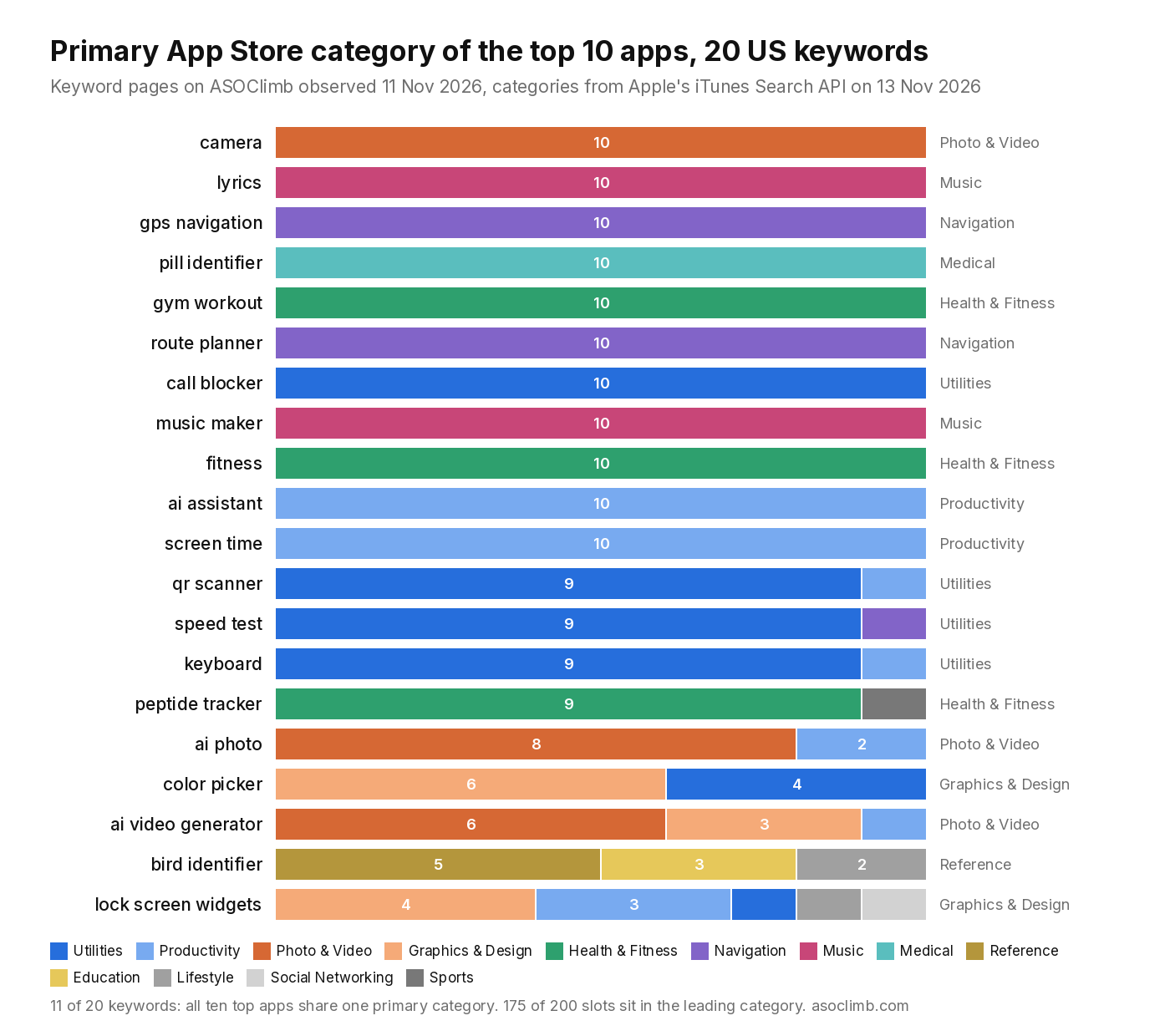
The numbers:
- 11 of 20 keywords had all ten top apps in the same primary category. Camera, lyrics, gps navigation, pill identifier, gym workout, route planner, call blocker, music maker, fitness, ai assistant and screen time.
- 4 more keywords had nine of ten in one category. Qr scanner, speed test and keyboard in Utilities, peptide tracker in Health & Fitness.
- Across all 200 slots, 175 (88%) belonged to the leading category for that keyword.
When I look at the exceptions one by one, most of them are not clever category choices. They are apps that rank for a different reason. Speedometer Simple sits at number 4 for speed test from Navigation, because it is a car speed app and the word "speed" matches. Grok and Google Gemini rank for ai photo from Productivity with 1.6 million and 2.4 million ratings. FC Athletics shows up at number 7 for peptide tracker from Sports with zero ratings, which looks like a keyword match more than a category decision.
For a small app, this tells me something plain. If nine or ten of the top apps for your main keyword share a primary category, that is the category people and Apple already connect with that search. Picking something else to stand out does not buy you much.
Where the category is split, the secondary slot does the work
Four keywords were genuinely mixed, and they are the interesting ones.
Color picker. Six apps chose Graphics & Design, four chose Utilities. When I count the secondary category too, eight of ten list Utilities in one of their two slots, and every app has Graphics & Design or Utilities as its primary. The apps covered both readings of the term. Half of this top 10 also had fewer than 10 ratings each, so this is a keyword where a new app with the right two categories has a real chance.
Ai video generator. Six chose Photo & Video, three chose Graphics & Design, and Grok took number 1 from Productivity. Nine of ten list Photo & Video as either primary or secondary. Most of the Graphics & Design apps simply put Photo & Video second.
Bird identifier. Five Reference, three Education, two Lifestyle. Merlin Bird ID from Cornell Lab is number 1 in Reference with Lifestyle second. This is a case where Apple's own definitions overlap: Reference lists animals among its examples, and Education lists things like astronomy and pet training.
Lock screen widgets. The most scattered result: four Graphics & Design, three Productivity, one Utilities, one Lifestyle and one Social Networking. I think the reason is that Apple has no category for this kind of app. Google Play has Personalization, which explicitly covers wallpapers and lock screen apps. On iOS, everyone guesses.
So for a split keyword, I read it this way. Pick the primary that matches what your app mainly does, then use the secondary for the other category the leaders use. You end up indexed for both, which is exactly what the color picker apps did.
Which secondary categories ranking apps pair with
161 of the 192 apps (84%) set a secondary category. 31 left it empty. Leaving it empty does not stop an app from ranking. Gboard and Apple's own Camera app both list only one. For a small app, though, the secondary slot is a free extra signal.
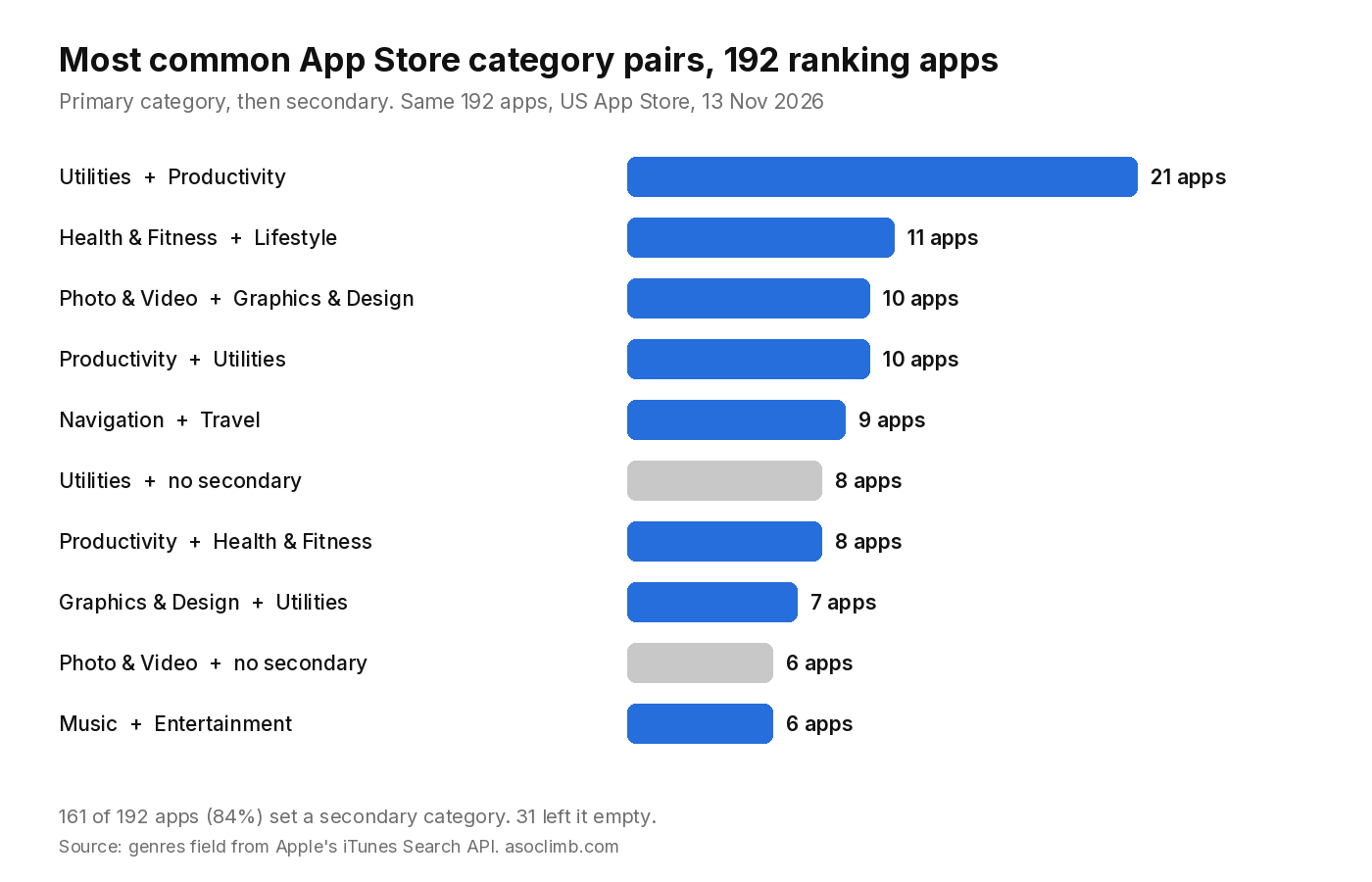
The most common pairs were:
- Utilities with Productivity second: 21 apps
- Health & Fitness with Lifestyle: 11
- Photo & Video with Graphics & Design: 10
- Productivity with Utilities: 10
- Navigation with Travel: 9
These pairs follow Apple's definitions closely. Utilities is for solving one task, Productivity is for making a process more organized, and a qr scanner or call blocker fits both. Navigation apps add Travel because route planning and trips are the same intent from another side.
Utilities was also the biggest primary category overall, with 42 of 192 apps (22%). Productivity, Photo & Video and Health & Fitness followed with 24 or 25 apps each.
How the category changes your keyword field
This is the part I see small teams miss most often. Apple indexes your category, and Apple asks you not to repeat category words in the keyword field.
Look at three of our keywords:
- gps navigation: all ten top apps are in Navigation
- fitness: all ten are in Health & Fitness
- music maker: all ten are in Music
If your app is in Navigation, Apple already has the word "navigation" from your category. Typing it again in the keyword field spends 11 characters on a word Apple has. The same goes for "fitness", "music", "photo", "video" and "health" when you are in those categories. That space is better used on terms that are not in your title, subtitle or category at all. Our guide to the App Store keyword field walks through that cleanup, and the App Store subtitle post covers the 30 characters that sit next to it.
My routine for choosing an App Store category
This takes about 15 minutes per app.
- Write down your three to five most important keywords. The ones you would put in the subtitle.
- Open the top 10 for each. You can search the App Store on a phone, or use a free keyword checker that lists the ranking apps for any term.
- Read each app's categories. The App Store page shows the primary category. For both, open
itunes.apple.com/lookup?id=followed by the number at the end of the app's App Store link and read the genres field. - Count. If nine or ten share a primary, use it, as long as it honestly describes your app.
- If the count is split, choose the primary that matches your main function and set the other as your secondary.
- Remove the category words from your keyword field.
- Track before and after. Note your positions for those keywords the week before the change and the week after. One day of ranks is noisy; our post on keyword rank tracking explains what to watch.
If you change the category, try to do it in an update where your title, subtitle and keyword field stay the same. Otherwise you cannot tell which change moved your ranks.
What about apps that fit two categories equally?
This is the photo sharing example Apple gives itself: Photo & Video or Social Networking. In my data, the answer the leaders chose usually matched the words people search. Apps ranking for camera all chose Photo & Video. If you are torn, look at which keyword brings you the most relevant installs and match that keyword's leading category. A competitor keyword gap check will often show which side of your app people actually search for.
Google Play works differently
Google Play gives you one category plus up to five tags. The Play Console Help page on choosing a category and tags says tags should be the ones most obviously relevant to your app, and recommends changing them only when the app itself changes a lot.
The category lists also do not line up with Apple's. Google puts keyboards in Productivity, while nine of ten top keyboard apps on iOS chose Utilities. Google has Personalization for wallpapers and lock screen apps, which Apple lacks. Google has Maps and Navigation where Apple has Navigation. So copy the decision process across, not the answer. Our Google Play store listing checklist covers the other Play fields.
The short version
Your App Store category is a search signal, not just a shelf. In this sample of 200 ranking slots, 88% sat in the leading category for their keyword, and 84% of the apps used the secondary slot. Match the category your main keyword's leaders use, put the second reading of your app in the secondary slot, and stop paying for category words in your keyword field.
If you want to run this check on your own keywords, ASOClimb's free keyword pages show the current top apps for each term, and you can track the keywords you care about before and after your next release.