
I keep getting the same question after someone finishes their App Store title: what should go in the App Store subtitle, and is it worth filling all 30 characters? Advice online often stops at "summarise the app." That is true, and too vague to ship.
So on 6 November 2026 I took another route. I pulled the top 10 apps from eight live ASOClimb keyword pages in the US storefront, opened each app's App Store product page, and wrote down the real subtitle under the name. Seventy five of those 78 apps had set one. This post shows what those lines look like, where the search keyword lands, how often a title word gets repeated, and a short rewrite method you can run on your own listing.
It sits next to our earlier notes on App Store title length and the App Store keyword field. Those cover the other two indexed text boxes. This one is only about the subtitle.
What Apple says about the App Store subtitle
Two Apple pages set the rules I care about.
The product page guide caps the field at 30 characters, puts it under the app name across the store, and asks for a concise phrase rather than a boast. Apple's own example of what to avoid is a generic line like "world's best app." Changes ship with a new app version, not on their own.
The App Store search page is clearer about ranking. Text relevance includes matches on title, subtitle, keywords and primary category, alongside behaviour signals such as downloads and ratings. The same page tells you not to repeat words from the name, subtitle or category inside the 100 character keyword field. That is why a subtitle that only echoes the title wastes two fields at once.
Google Play has no subtitle. The closest field is the 80 character short description above the full description. If you ship on both stores, rewrite for Play instead of pasting the iOS line. Our Google Play store listing checklist covers that field on its own terms.
What I counted on 6 November 2026
I started from eight public ASOClimb keyword pages for the US App Store: calorie tracker, workout log, vpn, ai chat, barcode scanner, music player, browser and fitness. For each page I took the top 10 ranked apps, resolved them in the iTunes Search API, then read the subtitle from the live App Store product page (the line under the H1). That gave 78 apps. Three showed only a category name in the subtitle slot, which is what Apple displays when the field is empty. The other 75 had a real subtitle. All lengths below use those 75.
I am not inventing search volume or download numbers here. Where I mention ASOClimb traffic or difficulty scores later, those are model estimates and I label them that way.
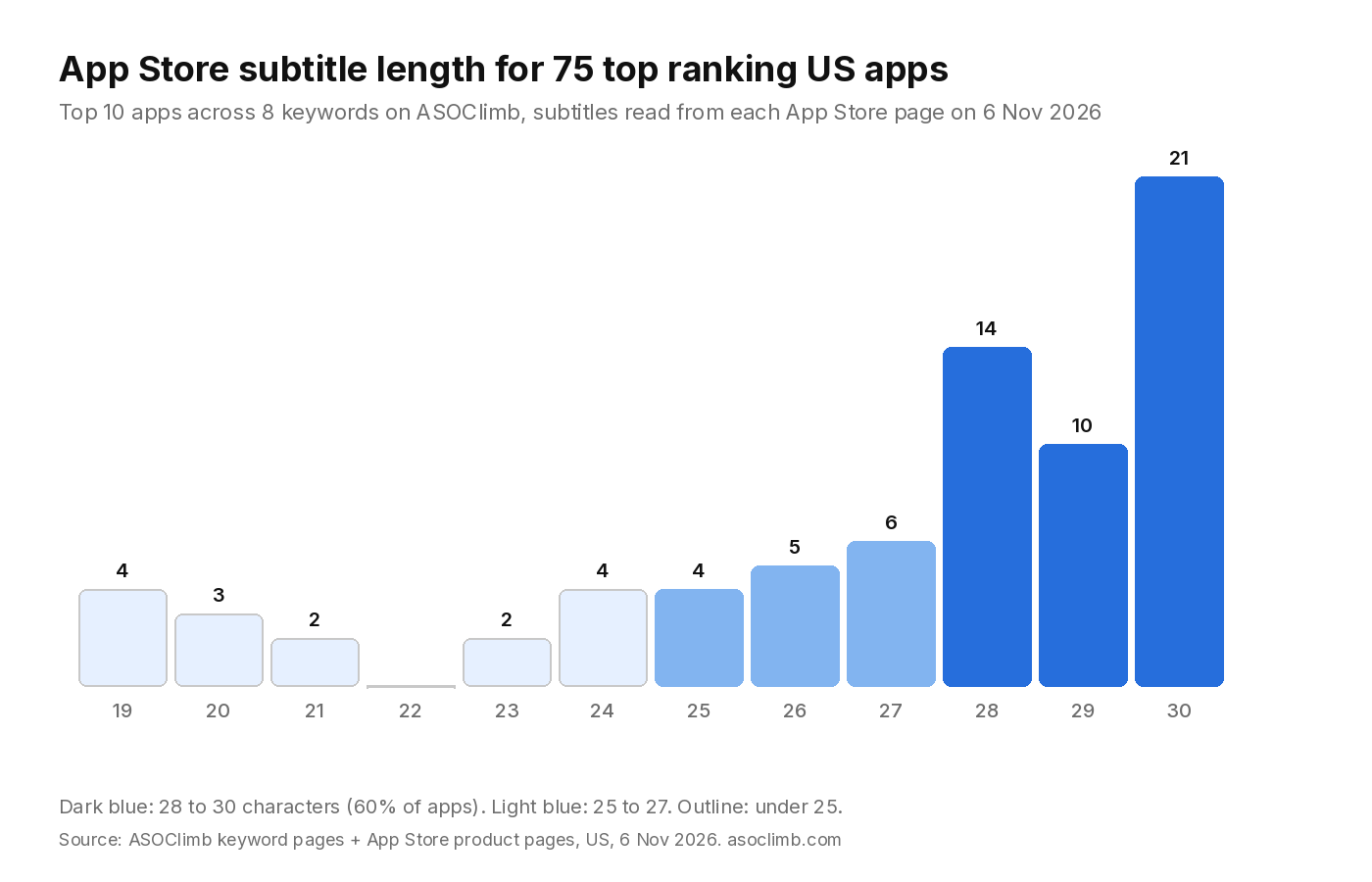
How long ranking apps make their App Store subtitle
Among the 75 apps with a real subtitle:
- The median length is 28 characters. The average is 27.0.
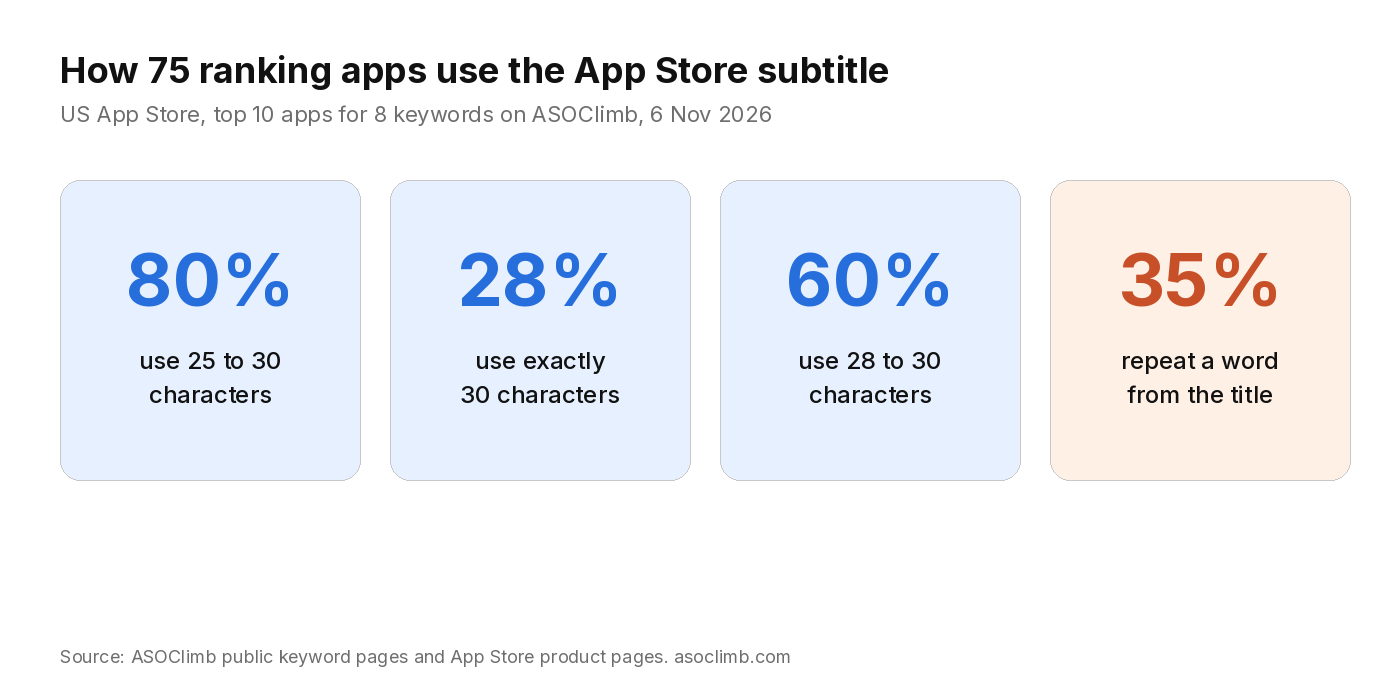
- 60 apps (80%) use 25 to 30 characters.
- 45 apps (60%) use 28 to 30 characters.
- 21 apps (28%) use exactly 30 characters.
- Only 7 apps (9%) use 20 characters or fewer.
That matches the pattern we saw in the broader title length study of 550 top free apps, where the median subtitle was also 28 and most charts filled the field. The new sample is useful because these apps are the ones currently ranking for competitive search terms, not just sitting on a top free chart.
Short brand titles still fill the subtitle. ChatGPT's title is 7 characters; its subtitle is "Your everyday AI assistant" (26). Apple Fitness sits at 13 characters in the title and still sets a subtitle. The empty subtitle habit shows up more often on older utilities than on apps fighting for "calorie tracker" or "workout log".
Do they put the search keyword in the subtitle?
It depends on whether the title already spent those words.
For calorie tracker, most titles already say "Calorie Counter" or "Calorie Tracker". The subtitles then shift to a second phrase: "AI Coach & Nutrition Tracker" (MyFitnessPal, 28), "Food Nutrition Macro Tracker" (MyNetDiary, 28), "Nutrition, macro, diet tracker" (Cronometer, 30), "Food Tracker for Weight Loss" (Lose It!, 28). None of the top 10 put the full phrase "calorie tracker" in the subtitle again. Eight of them still used a related word like tracker, food or macro.
For workout log, seven of the top 10 already pack "workout" and "log" into a 29 or 30 character title (Strong, Hevy, Gript, Fitlist and others). Their subtitles move to strength training language: "Weight Lifting Routine Planner" (Hevy, 30), "Strength Training Planner" (Strong, 25), "Gym & Weight Lifting Tracker" (Fitlist, 28). Only three subtitles still carried a workout related word.
VPN is the opposite. Every title in the top 10 already contains "VPN", and eight of the ten subtitles repeat "VPN" anyway: "WiFi Security & Privacy VPN", "Best School VPN for iPhone", "Super Fast & Unlimited VPN". That is a crowded category where every app fights for the same head term, so they burn characters on a repeat. It works as branding. It is weak as indexing, because the keyword field is supposed to hold the extra words and Apple asks you not to duplicate the subtitle there.
How often the subtitle repeats a title word
26 of the 75 real subtitles (35%) share at least one meaningful word with the title. VPN drives a lot of that. Outside VPN, the better listings treat the subtitle as a second phrase:
| App title | App Store subtitle | Chars |
|---|---|---|
| MyFitnessPal: Calorie Counter | AI Coach & Nutrition Tracker | 28 |
| Hevy (full title packs Workout Tracker Gym Log) | Weight Lifting Routine Planner | 30 |
| Brave Browser & Search Engine | Adblock, Web Privacy, VPN | 25 |
| QR Reader for iPhone | QR Code, Barcode & PDF Scanner | 30 |
| Firefox Fast & Private Browser | Browse the web with ad blocker | 30 |
A repeat is not always a mistake. A delivery app that must keep "radar" visible might repeat it. For most indie apps, every repeated word is a search phrase you did not buy.
A practical way to spend all 30 characters
Here is the method I use when I rewrite an App Store subtitle for a small app.
1. Write the title first, then free the leftover words
The title is 30 characters too. Put the brand and the primary search phrase there if the brand is not already famous. Our title length study found that half of top free apps use 25 to 30 title characters, mostly in that brand plus phrase shape. Once the title is set, list every important word it already used. Those words are spent. The subtitle should not spend them again.
2. Pick one second phrase, not a slogan
Good subtitles name a job, audience or feature the title skipped. "Weight Lifting Routine Planner" tells a Strong or Hevy searcher what kind of workout log they get. "Adblock, Web Privacy, VPN" tells a Brave searcher what the browser does beyond browsing. "Your everyday AI assistant" works for ChatGPT because the brand is the search term and the subtitle only has to explain the job.
Avoid empty praise. Apple already called out "world's best app". Lines like "The ultimate fitness experience" waste the same 30 characters.
3. Aim for 26 to 30 characters on purpose
In this sample, 80% of ranking apps land between 25 and 30. Leaving the subtitle at 18 characters usually means you stopped early, not that you found a punchier line. Count in App Store Connect, not in a notes app that treats an emoji differently. Apple's limit is 30 characters as stored.
4. Check the keyword field for collisions
After the subtitle is drafted, open the 100 character keyword field and delete any word that now appears in the title or subtitle. Apple's search page asks for that, and it also frees room for new terms. The walkthrough is in App Store keyword field: how to use all 100 characters.
5. Match the subtitle to what your screenshots prove
Search results show the subtitle next to your icon and the first screenshots. If the subtitle promises "AI Coach" and the first three screenshots are a static food diary, the tap to install rate suffers even if the ranking holds. Keep the phrase honest.
Worked example: a habit app rewriting its App Store subtitle
Suppose the title is "Forge: Habit Tracker" (20 characters). Words already used: forge, habit, tracker.
A weak subtitle: "Best Habit Tracker App" (22). It repeats habit and tracker, adds the useless word app, and still leaves eight characters empty.
A stronger subtitle: "Streaks, Reminders, Journal" (27). New words, concrete features, close to the ceiling.
If the product is more social: "Habits with Friends & Groups" (28). If it is focused on one niche: "Reading Habit Daily Goals" (25) only makes sense when the screenshots are about reading. Pick the phrase that matches the real product and the search theme you want the default page to win.
You can paste a draft title, subtitle and keyword field into the free keyword checker to see overlapping words before you submit a version.
How the App Store subtitle fits with custom pages
Custom product pages can now appear in search for assigned keywords, but they do not get their own subtitle. The title and subtitle stay global. Screenshots, previews and promotional text change per page. So if you run the three page plan from custom product page keywords, the subtitle still has to work for every theme. Keep it broad enough to stay honest across those pages, and put theme specific promises in the screenshots instead.
What I would do next on your listing
- Open your App Store Connect version and copy the current title, subtitle and keyword field into a text file.
- Count the subtitle. If it is under 25 characters, rewrite toward 26 to 30 with a second phrase.
- Strike every word that appears in both the title and the subtitle, unless you have a clear brand reason to keep it.
- Move the freed ideas into the keyword field, comma separated, no spaces after commas, no repeats.
- Submit the version, then watch App Analytics for impressions and conversion from search for two to four weeks before you judge the change.
If you want a second opinion on whether a keyword is even worth the fight, our modeled traffic and difficulty scores on each keyword page are a starting point. They are model estimates, not Apple figures. The method behind them is in ASO keyword difficulty explained.
Thirty characters is not much room. The apps that rank for hard keywords still use most of it, usually on a phrase the title left open. Write that phrase first, then clean the keyword field so those words are not typed twice.