
Most indie developers I talk to write App Store release notes in the last five minutes before they hit Submit for Review. The box says What's New, the build is ready, and "Bug fixes and improvements" goes in.
So this week I wanted to see what the apps that actually rank put in that field. On 10 November 2026 I took the top 10 apps from 15 public ASOClimb keyword pages in the US App Store, matched each one in Apple's iTunes lookup API, and read the current What's New text for all 150 of them. Then I sorted every note by what it says. This post shows the split, the notes worth copying, and a short template you can reuse on your next update.
What Apple says about App Store release notes
Three Apple pages cover the field.
The App Store Connect Help page on platform version information calls it What's New in This Version. It holds up to 4,000 characters, it is not available on your first version, and it is required for every version after that. Apple's own wording recommends telling users the specifics of the changes, improvements or fixes.
The App Review Guidelines, rule 2.3.12, add one real constraint. New features and product changes have to be described clearly. Simple bug fixes, security updates and performance tweaks may use a generic line. Bigger changes must be listed.
And Apple's App Store search page for developers lists the text Apple matches for relevance: title, subtitle, keywords and primary category. What's New is not on that list. So stuffing search terms into release notes does nothing for ranking. Your keyword work belongs in the App Store subtitle and the 100 character keyword field.
Google Play works differently. The Play Console help for preparing a release says release notes are entered per language and should inform users about recent updates, not promote or ask users to do things. The field is capped at 500 characters per language, so a long iOS note will not paste across as is.
How I collected the 150 notes
I started from these ASOClimb keyword pages for the US storefront, all observed on 8 November 2026: calorie tracker, workout log, vpn, ai chat, barcode scanner, music player, browser, screen recorder, video editor, voice recorder, rock identifier, speedometer, photo collage, calculator and call recorder.
For each page I took ranks 1 to 10, so 150 apps with no repeats. I matched each name and developer in the iTunes Search API, checked the developer by hand where the name was ambiguous, and pulled releaseNotes and currentVersionReleaseDate from the lookup on 10 November.
Then I labelled every note myself into four groups:
- Names a real change. At least one fix or feature a user could notice, like a new widget or a crash on a named screen.
- Vague. Only "bug fixes", "performance improvements" or friendly filler that names nothing.
- Reads like ad copy. Feature claims and sales lines that would fit the description better.
- Empty. Nothing in the field.
This is my reading, not an algorithm. A few notes sat on the line, and I put them where a normal user would put them. I am not claiming any of this moves rankings or conversion on its own. It is a snapshot of what ranking apps do.
What the 150 App Store release notes say
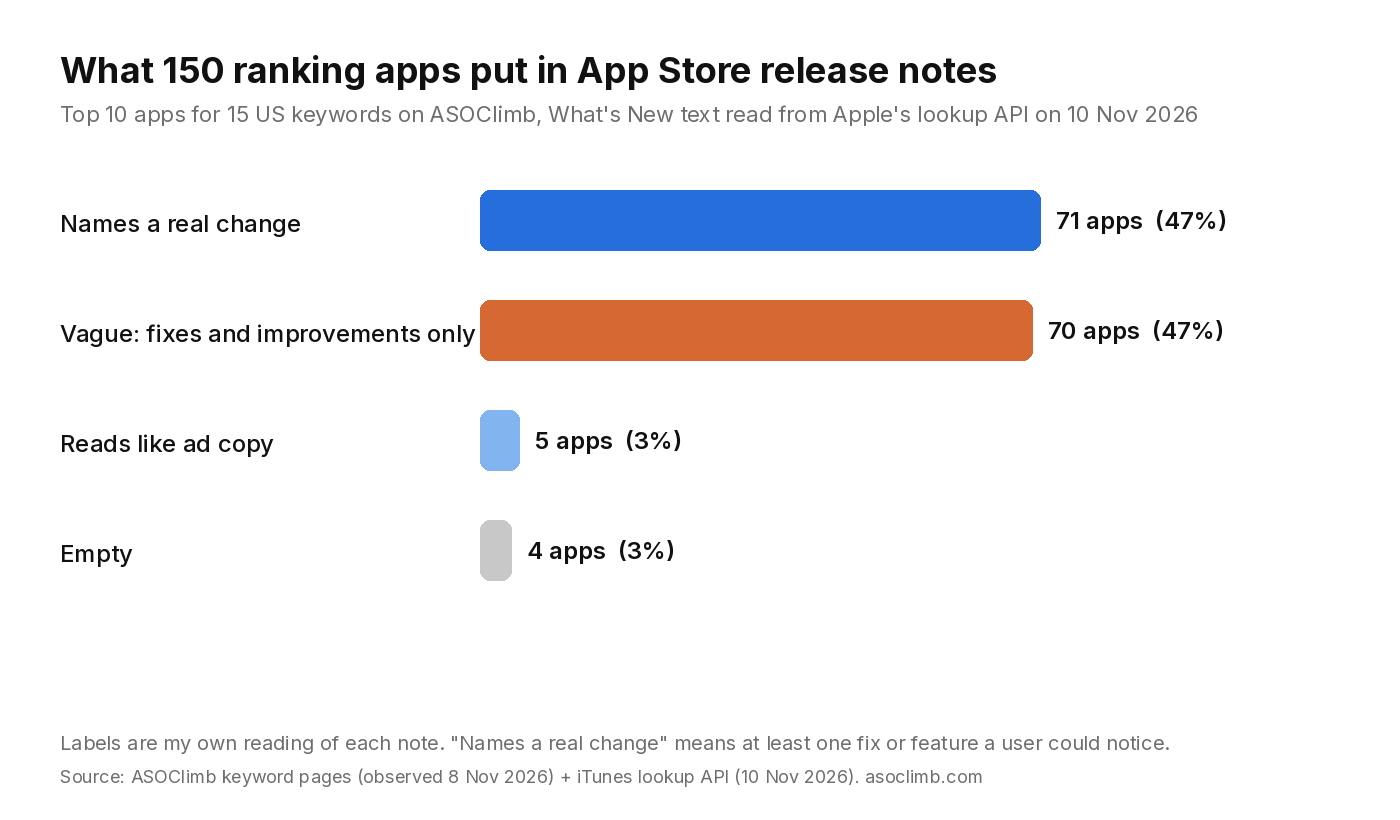
The split was almost even:
- 71 apps (47%) named at least one real change.
- 70 apps (47%) wrote something vague.
- 5 apps (3%) pasted something that reads like their description or an ad.
- 4 apps (3%) left the field empty.
A few more counts from the same set:
- The words "bug fix" or "bug fixes" appear in 52 notes, about a third.
- The median note is 132 characters. 67 notes are 100 characters or less.
- Vague notes are short. Their median is about 40 characters, and 40 of them are under 60.
- Specific notes have a median of 255 characters. Naming a change takes a sentence or two, not a page.
- 18 notes run past 500 characters, which would not fit in Google Play's field.
- 11 notes ask for a rating or review, and 25 include a support email, link or "let us know" line.
The top of each list is only slightly different. Among apps at ranks 1 to 3, 24 of 45 (53%) named a real change. At ranks 4 to 10 it was 47 of 105 (45%). That gap is small and the sample is small, so I read it as "ranking apps are split", not as proof that good notes rank.
Big brands also get away with less. ChatGPT, number one for ai chat, says "Bug fixes and small improvements." Spotify says "We're always making changes and improvements to Spotify." A known brand does not need its release notes to earn trust. A new app with 40 ratings probably does.
How often ranking apps ship updates
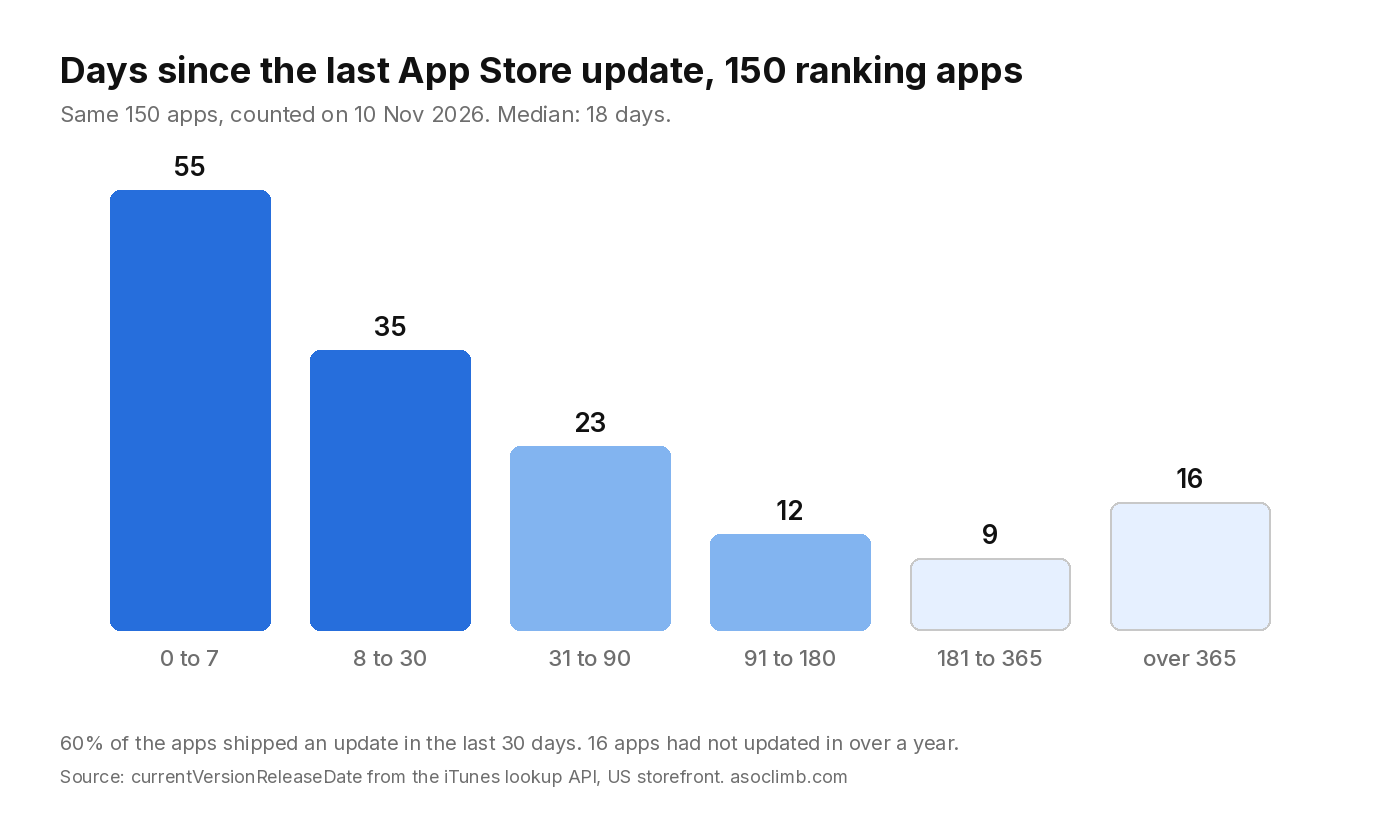
The update dates were more surprising to me than the notes.
- 55 apps (37%) had shipped a version in the 7 days before I checked.
- 90 apps (60%) had shipped in the last 30 days.
- The median gap was 18 days.
- 16 apps had not shipped anything in over a year, and they still sit in a top 10.
The quiet ones cluster in a few niches. On the speedometer page, none of the top 10 had updated in the last 30 days, and the median gap was about four months. On calorie tracker, all 10 had updated within 30 days. If your niche looks like speedometer, the field is old and an active app has room. If it looks like calorie tracker, shipping every few weeks is just keeping pace.
Twelve notes mention iOS 27 or iPhone Duo support, and six mention Halloween or fall themes. Seasonal content and new OS support are both easy, honest things to name in a note.
Release notes worth copying
These are real notes from the set. I picked them because they are short, specific and written for users.
Hevy, rank 2 for workout log
The note lists four changes in plain words, then ends with the generic line. My favourite item: "Hevy now warns you right away when you complete a set with 0 reps, time or distance." Anyone who has logged an empty set knows exactly what that fixes. The whole note is 297 characters, so it would fit on Google Play too.
Cronometer, rank 4 for calorie tracker
Two lines, 89 characters. "Redesigned, customizable plus menu." Then one named fix. It proves a note does not need to be long to be specific.
Record it!, rank 1 for screen recorder
One fix, one sentence of context. It quotes the error people saw, "Can't Open Your Library", and says the library is now restored automatically. A user who left a one star review about that error can see it was fixed.
Calorie Tracker + Counter, rank 10 for calorie tracker
Four bullets, each one a thing you can try today: a weight trend widget, lock screen widgets, exact portions in grams, and decimals in your weight. No adjectives, no thanks paragraph.
Release notes I would rewrite
MyFitnessPal, rank 1 for calorie tracker, wrote a Halloween joke and then: "No major feature updates or bugs to report this week." It is honest and on brand, but a new reader learns nothing. For a market leader that is fine. For a small app, that slot is wasted.
One VPN app in the top 10 packed its note with search phrases, ending with "Enjoy VPN Free iPhone, Unlimited VPN, and VPN Unlimited protection." Since Apple does not use this field for search relevance, all that does is make the note harder to read.
And the most common pattern, a single line like "Bug fixes and improvements", is allowed for small fixes under rule 2.3.12. The problem is when a real feature ships under that same line. You paid to build it and then told nobody.
A simple template for App Store release notes
This is the format I would use. It fits in 500 characters, so the same text works on Google Play.
- One headline change. Lead with the thing users will notice, in their words, not your ticket title. "You can now export workouts as CSV" beats "Export improvements".
- Up to three more items. One line each. Name the screen or the action.
- Fixes people reported. If reviews mentioned a crash or a bug, name it. "Fixed the crash when opening a photo from a notification."
- One generic line, last. "Plus smaller fixes and speed improvements." Apple allows this for the minor stuff.
- Optional: one contact line. A support email or "reply in Settings > Feedback". Keep the rating ask out of here; Google Play's help says not to solicit actions, and on iOS it reads as filler.
Before you paste it, count characters. If the note is over 500, cut items rather than squeezing words, because Play will reject it.
Use release days to check your keywords
Release notes do not change your ranking, but release day is when you change the fields that do. A new title, subtitle or keyword field ships with the same version. That makes it the right moment to note where you rank before the update and check again a week later.
In ASOClimb that means saving the keywords you care about before you submit, then comparing positions after the version goes live. Our post on keyword rank tracking explains why a single day's rank is noisy and how to read a week of data instead. If you want to check one keyword for free first, the keyword checker shows the current top apps for any term, the same pages I used for this study.
Write the note for the person who left you a review last week. Name what you fixed. That costs about 200 characters, and most ranking apps still skip it.