
If you are searching for a Wow Keywords alternative, you have probably already looked at Wow Keywords itself and liked the idea, but want to know what else does the same job and how the options really differ. This guide compares the two tools I know best for App Store and Google Play keyword work, ASOClimb and Wow Keywords, using only what each one publishes today. I build ASOClimb, so I will be clear about where the other tool is the better pick.
The short version: Wow Keywords is a desktop app you buy once and run on your own machine. ASOClimb is a web tool you open in any browser, free to start. Both research keywords in each country, track ranks and expose an MCP server for AI agents. The right Wow Keywords alternative depends on how you like to work, not on a feature count.
What Wow Keywords is
Wow Keywords is a native app for Mac and Windows. Its site describes a four step flow: audit your listing in every country, let AI rewrite it in 50 languages, upload or export the result, then monitor your ranks (Wow Keywords). Your keyword database lives on your own computer, every check is a live store search, and there is no account or cloud sync.
The pricing is the headline difference from most ASO tools. Wow Keywords is a single payment for lifetime access with updates included, shown at $99 on its pricing page with a money back guarantee (Wow Keywords pricing). It does not bundle an AI subscription. Instead you connect the AI you already pay for, such as Claude Code, Codex, Cursor, Gemini, Grok or a local model, and its built in MCP server exposes 139 tools to those agents.
What ASOClimb is
ASOClimb is a web application. There is nothing to install and no operating system requirement, so it runs the same on a Mac, a Windows PC, a Chromebook or a phone browser. It does App Store and Google Play keyword research, rank tracking, competitor analysis, niche discovery, top charts, revenue estimates and rank alerts, and it ships an MCP server so Claude and Grok can run the same work through the ASOClimb connector.
ASOClimb starts free. The Free plan is $0 forever with no card, covering one app, 25 keywords observed daily and 5 competitors, with every feature switched on at small volumes. Pro is $10 a month or $100 a year for up to 50 apps and 1,500 tracked keywords, according to the pricing page. The named feature that matches Wow Keywords most directly is Wow Keywords inside ASOClimb, which scores keywords for popularity and difficulty.
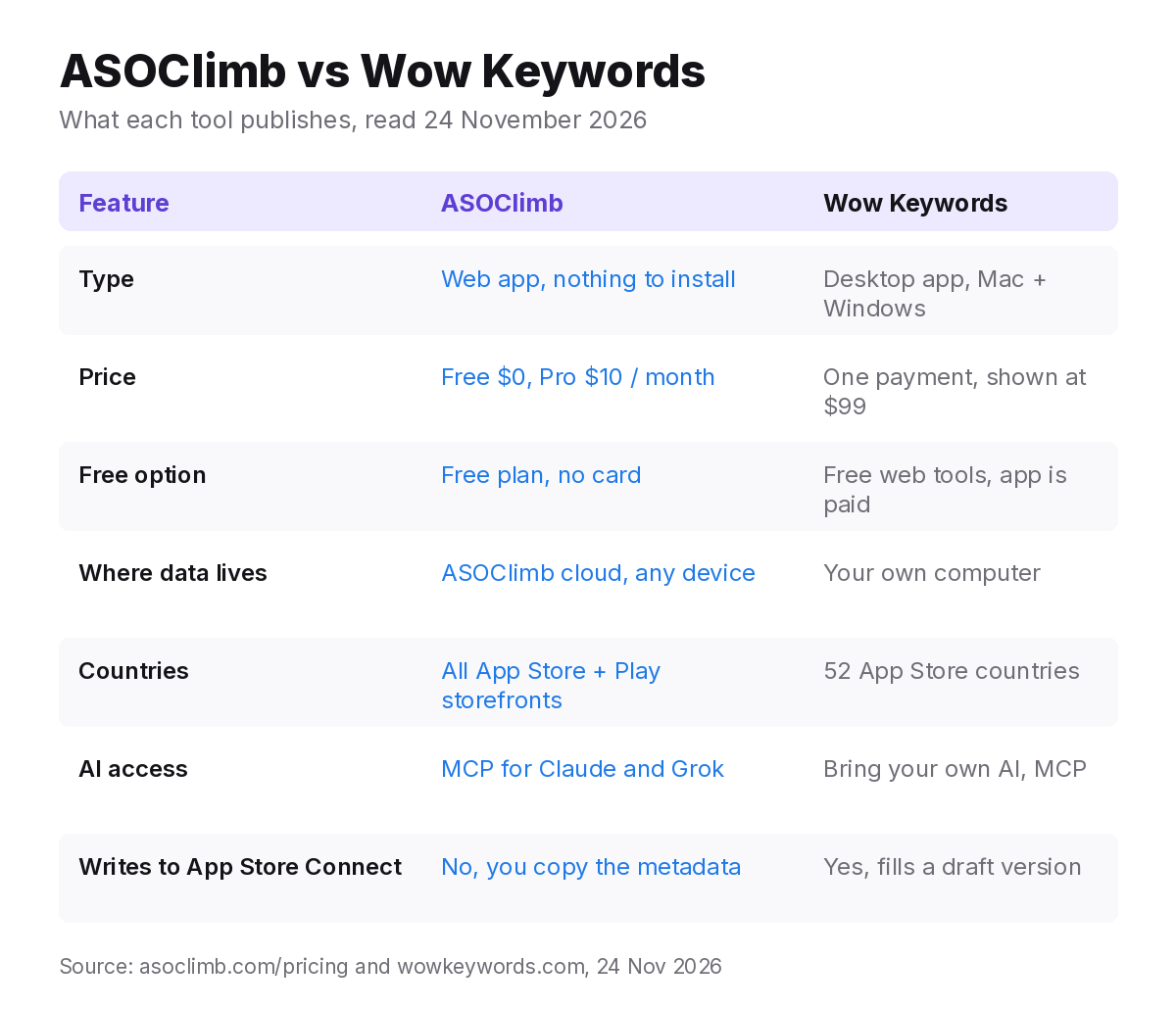
Wow Keywords alternative at a glance
| ASOClimb | Wow Keywords | |
|---|---|---|
| Type | Web app, nothing to install | Desktop app for Mac and Windows |
| Price | Free $0, or Pro $10 a month or $100 a year | One payment, shown at $99 for lifetime access |
| Free option | Free plan, no card | Free web tools, app is paid |
| Where data lives | ASOClimb cloud, open on any device | Your own computer |
| Countries | All App Store and Google Play storefronts | 52 App Store countries |
| Stores | App Store and Google Play | App Store and Google Play |
| AI | MCP server for Claude and Grok, no extra AI bill on Free | Connect your own AI, MCP server with 139 tools |
| Writes to App Store Connect | No, you copy the metadata across | Yes, fills a draft version you approve |
Sources: the ASOClimb pricing page and the Wow Keywords and Wow Keywords pricing pages, read 24 November 2026.
Where Wow Keywords is the better pick
I would reach for Wow Keywords in a few clear cases.
You want to own the tool, not rent it
A single payment for lifetime access is genuinely different from a subscription. If you work on one or two apps for years and dislike recurring bills, buying once can be the cheaper path over time.
You want your data on your own machine
Wow Keywords keeps your keyword database on your computer with no cloud sync. If that matches how you think about data, a desktop app is the natural fit, and ASOClimb being cloud first is a real tradeoff for you.
You want the tool to write your listing into App Store Connect
Wow Keywords can fill a draft version in App Store Connect and export to fastlane. ASOClimb shows you the metadata to use, but you copy it across yourself. If you ship listing changes often, that upload step saves real time.
You already pay for an AI and want to bring it
Because Wow Keywords adds no AI subscription and connects to the model you already use, a heavy AI user avoids a second bill. Your provider's own usage limits and charges still apply.
Where ASOClimb is the better pick
The reasons people look for a Wow Keywords alternative usually map to these.
You want to start free, today, with no install
ASOClimb's Free plan needs no card and no download. You open a browser, add one app and see keyword data in minutes. A desktop app asks you to install first and, for the full workflow, to pay first.
You are not on a supported desktop
Wow Keywords runs on macOS 14 or later and a Windows 11 beta. If you are on an older Mac, a Chromebook, Linux or you mostly work from a phone, a web tool is the only option that works everywhere.
You want to share work with a team or a client
A web tool has one obvious advantage: anyone with the link and access can open the same data. A single machine license, two computers on Wow Keywords, is built for a solo developer rather than a team.
You want revenue estimates and niche discovery in the same place
ASOClimb pairs keyword work with revenue estimates and niche discovery, so you can size a market and find keywords without leaving the tool. Our keyword research workflow walks through how those pieces fit together.
How the keyword data differs
Both tools estimate the same two numbers, popularity and difficulty, and both are honest that these are estimates, not Apple's own search counts.
Wow Keywords says its volume estimates the audience behind a keyword from the ratings of the apps that match it, and that difficulty shows how hard it is to reach the top 10 (Wow Keywords). ASOClimb builds its own popularity and difficulty scores from live store rankings and the apps that hold them, and labels them as models rather than store reported volume. If you want to understand what a difficulty number really means before you trust it, read how ASO keyword difficulty works.
Neither tool can show Apple's true search volume, because Apple does not publish it outside Apple Search Ads. Apple says App Store search ranks on text relevance and user behaviour such as downloads, ratings and reviews (Apple Developer: App Store search). Any tool that claims exact volume is guessing with more confidence than the data allows.
One practical difference: ASOClimb checks ranks across every App Store and Google Play storefront, while Wow Keywords lists 52 App Store countries. If you optimise for many local markets, test both against the exact countries you care about. Our post on keyword ranks by country explains why each storefront is its own list.
Other Wow Keywords alternatives
Wow Keywords and ASOClimb are not the only options. From vendor pricing pages read on 20 November 2026:
- Sonar Indie is $29 a month or $290 a year for 10 apps and 2,500 keywords, with all countries and MCP access.
- AppTweak Essential lists $99 a month, or $949 billed yearly, for 5 apps and 500 keywords, aimed at growth teams.
- Keyword Scout is a one time $9.99 Apple only app, the closest in spirit to Wow Keywords if you want a cheap desktop buy for iOS alone.
I go through nine tools, with the limits and prices side by side, in the best ASO tools comparison. You can also see ASOClimb next to specific tools on the compare page.
How to try ASOClimb as your alternative
If you want to test ASOClimb as your Wow Keywords alternative, here is the fastest path.
- Open the free keyword checker and type a keyword your app should rank for. It is free and needs no account, so you can judge the data before signing up.
- Create a free account on ASOClimb and add your app. The Free plan tracks 25 keywords observed daily with no card.
- Run Wow Keywords inside ASOClimb on your app to get popularity and difficulty scores for a batch of keywords at once.
- Connect the MCP server to Claude or Grok if you want your AI agent to pull the same data, the way our ASO MCP guide describes.
- If you track a portfolio, move to Pro at $10 a month for 50 apps and 1,500 keywords. The pricing page lists exactly what each plan includes.
Both tools are good at the core job. Pick the one that fits how you work: buy a desktop app once and keep your data local, or open a free web tool on any device and grow into a paid plan only when a portfolio needs it.
FAQ
What is the best Wow Keywords alternative? It depends on how you work. ASOClimb is the closest free web alternative, with App Store and Google Play keyword research, rank tracking and an MCP server, starting at $0 with no card. Sonar and AppTweak suit larger teams, and Keyword Scout is a cheap one time desktop buy for iOS only.
Is ASOClimb free? Yes. ASOClimb has a Free plan at $0 forever with no card, covering one app, 25 keywords observed daily and 5 competitors. Pro is $10 a month or $100 a year for up to 50 apps and 1,500 tracked keywords, per the pricing page.
How much does Wow Keywords cost? Wow Keywords is a single payment for lifetime access, shown at $99 on its pricing page with a money back guarantee and updates included. It adds no AI subscription, so you connect your own AI model.
Does ASOClimb work on Mac and Windows? ASOClimb is a web app, so it runs in any browser on Mac, Windows, Linux, Chromebook or a phone, with nothing to install. Wow Keywords is a native app for macOS 14 or later and a Windows 11 beta.
Can my AI agent use ASOClimb like Wow Keywords? Yes. ASOClimb ships an MCP server so Claude and Grok can run keyword research and rank checks through the connector. Wow Keywords also has an MCP server and connects to agents such as Claude Code, Codex and Cursor using your own AI model.