
Most lists of the best ASO tools rank products by feel and quote prices that went stale months ago. This one does something narrower. We opened the official pricing page of nine App Store and Google Play optimization tools on 20 November 2026 and wrote down what each one actually lists: the cheapest plan that tracks keyword rankings, how many keywords and apps it covers, and which stores it supports.
We build ASOClimb, so it is one of the nine. Read our row with that in mind, and check any price on the vendor's page before you buy, because these change often.
How we compared the best ASO tools
Every number below comes from the vendor's own website, read on 20 November 2026. We did not use review sites, other roundups or remembered prices. A few rules kept the comparison fair:
- Entry plan that tracks rankings. Some tools have a free tier or a cheap analytics tier that does not track keywords. We list the first plan where keyword rank tracking is included, plus any free option.
- Monthly billing where the vendor shows it. Yearly prices are noted next to it. Prices are in the currency the vendor shows, excluding tax.
- Only stated limits. Where a page does not state a keyword or app limit, the table says so instead of guessing.
- No accuracy claims. We did not run the same keywords through all nine tools, so this is a comparison of price, limits and scope, not of data quality.
That last point matters. Neither Apple nor Google publishes keyword search volume, so every tool shows its own modeled popularity or volume score. Apple's own App Store search page explains what affects ranking but gives no search counts. Treat any tool's volume as a way to compare keywords with each other, not as a count of searches.
The best ASO tools side by side
| Tool | Cheapest plan that tracks ranks | Tracked keywords | Apps | Stores | Free option |
|---|---|---|---|---|---|
| ASOClimb | Free $0; Pro $10/month or $100/year | 25 keywords free; 1,500 on Pro | 1 app free; 50 on Pro | App Store, Google Play | Free plan, no card |
| Astro | $108 billed yearly (shown as $9/month) | Unlimited keywords | Unlimited apps | App Store | None listed |
| Keyword Scout | $9.99 once for Pro | Keyword limit not stated | App limit not stated | App Store | Free: 10 searches a day |
| MobileAction | Lite $15/month ($12.5/month yearly) | 100 keywords | 5 apps | App Store, Google Play | Free tier for Apple Ads only |
| Sonar | Indie $29/month or $290/year | 2,500 keywords | 10 apps | App Store, Google Play | Free research mode, no tracking |
| Appfigures | Monitor $44.99/month; Optimize $149.99/month | 100 keywords on Monitor; 500 on Optimize | App limit not stated | App Store, Google Play | Free Starter plan |
| App Radar | Essentials €69/month (€58/month yearly) | 500 keywords | 2 apps | App Store, Google Play | None listed |
| AppTweak | Essential $99/month, or $949 billed yearly (shown as $79/month) | 500 keywords | 5 apps | App Store, Google Play | Free Starter plan, estimates only |
| Sensor Tower | Quote only | Keyword limit not published | App limit not published | App Store, Google Play | None listed |
Source: each vendor's pricing or home page, read 20 November 2026. "Apps" means the apps you can follow at that price as the vendor counts them.
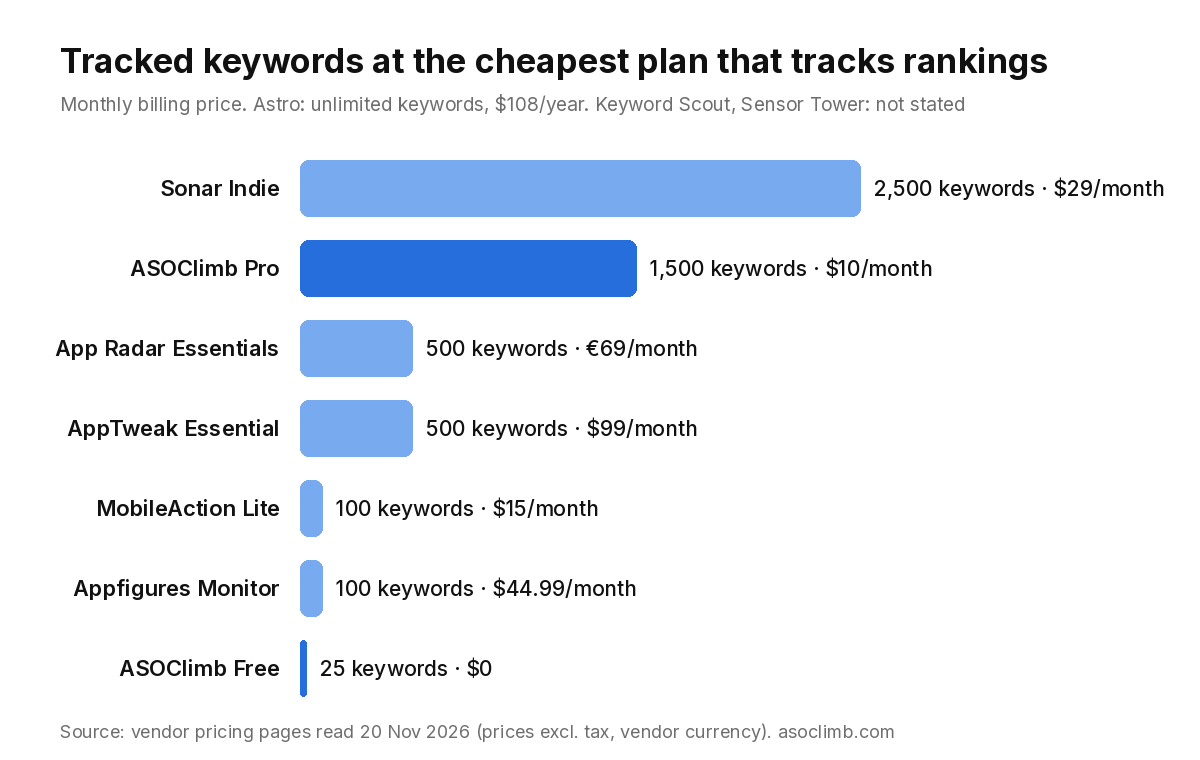
Two things stand out. First, entry prices for rank tracking run from $9.99 once to $99 a month, and Sensor Tower does not publish a price at all ("We customize pricing plans for each customer"). Second, the number of keywords you get ranges from 25 on ASOClimb Free and 100 on the cheapest paid plans to 2,500 on Sonar Indie, and Astro has no keyword cap. Price alone tells you little until you know how many keywords and apps you need.
Which of the best ASO tools fits your situation
One iOS app, smallest possible spend
Keyword Scout is free to start with 10 keyword searches a day and costs $9.99 once for Pro. It runs on iPhone, iPad and Mac, keeps your data on your device, and uses Apple's public iTunes Search API. Astro is a Mac app (macOS 14 and up) at $108 a year with unlimited keywords. Its site says it takes popularity data from Apple Search Ads and covers more than 60 stores. Both are App Store tools, so neither helps with Google Play. Our Astro comparison goes deeper.
One app on both stores, no budget yet
ASOClimb's Free plan is $0 with no card: 1 app, 25 keywords observed daily, 5 competitors and 25 keyword inspections a month, with every feature switched on at small volumes, according to the pricing page. One app means one App Store or Google Play listing. Appfigures also has a free Starter plan, but on its pricing page keyword tracking starts at Monitor ($44.99 a month, 100 keywords).
A portfolio of apps on a small budget
This is where list prices diverge most. ASOClimb Pro is $10 a month or $100 a year for 50 apps and 1,500 tracked keywords. Sonar Indie is $29 a month for 10 apps and 2,500 keywords, with unlimited competitors, all countries and API, CLI and MCP access included. MobileAction Lite is $15 a month for 5 apps and 100 keywords. If you need more keywords per app than apps, Sonar's limits suit you better; if you have many small apps, ASOClimb's do. See our Sonar comparison.
A growth team that needs market intelligence
AppTweak Essential lists $99 a month on monthly billing, or $949 a year, for 5 apps, 500 keywords and 6 months of history, and AppTweak says it fetches volume from Apple every day. Its higher plans add organic installs per keyword and longer history. App Radar Essentials is €69 a month for 2 apps and 500 keywords, with store listing editing and review replies on its plans. Appfigures Optimize ($149.99 a month, 500 keywords) bundles download and revenue tracking for your own apps. Sensor Tower sells custom plans covering app, ad, web and game data, and lists an MCP server. These tools cost more because they cover far more than keyword research. Our AppTweak comparison sets it against ASOClimb line by line.
How to choose an ASO tool, step by step
You can make this decision in an afternoon without paying for anything.
Step 1: Count the keywords and apps you actually need
Write down every app and store listing you want to track, then a realistic keyword list for each listing and country. Multiply. That number, not the feature list, rules out most plans in the table. Our free ASO tool guide shows how far you can get with the stores' own data first.
Step 2: Decide which stores and countries matter
If you only ship on iOS, the App Store only tools are cheaper. If you also ship on Android, cross out Astro and Keyword Scout. If you localize, check the country count on the vendor's page; Astro lists more than 60 stores, Sonar Indie lists all countries, and ASOClimb Pro allows all countries in each keyword research run.
Step 3: Test the keyword data on terms you already know
Pick five keywords where you know roughly where your app ranks. Run them through the free option of each shortlisted tool. In ASOClimb you can do this without an account in the keyword checker and the public ASO tool. Compare the ranks you see with what you see on a device in that country. Rankings are dated observations, so small differences between tools are normal.
Step 4: Read how the scores are built
Every tool models popularity and difficulty differently. Look for a methodology page. Ours is the keyword scores methodology, and our post on keyword difficulty explains why a score is a starting point, not a verdict. If a vendor will not say how volume is estimated, weigh that.
Step 5: Track for two weeks before you commit
Add your app and its keywords and let the tool record daily ranks for two weeks. You will learn whether the dashboard fits how you work, and you will have a baseline for any metadata change. Our rank tracking guide covers what to log.
Step 6: Let research turn into a draft listing
The point of all this is a better title, subtitle and keyword field. ASOClimb Wow Keywords starts from your app link, scores keyword candidates for relevance, popularity and difficulty, and writes listing variants within Apple's 30, 30 and 100 character limits. Wow Keywords is in early access, and the Free plan includes 1 run a month for up to 3 countries. If you work in Claude or Grok, the ASOClimb MCP connector runs the same research from a chat.
Where ASOClimb is weaker
Being fair about our own tool is part of a useful comparison.
- No uploads to the stores. Wow Keywords saves a variant as a draft in ASOClimb, and you copy it into App Store Connect or the Google Play Console yourself. Some tools on this list upload listings for you.
- Modeled popularity, not Apple data. ASOClimb's popularity is an index built from autocomplete position and the rating counts of ranking apps. Astro and AppTweak both say they use Apple's own popularity data.
- Shorter history and less market data. AppTweak says its data goes back to 2019 and offers organic installs per keyword on higher plans. ASOClimb has revenue and download estimates as ranges, but nothing like Sensor Tower's ad and web coverage.
If those gaps matter more than price, one of the larger tools is the better pick. The full set of one to one pages is on our comparison hub.
The short version
There is no single best ASO tool. For one iOS app on almost no budget, Keyword Scout or Astro. For one app on both stores at $0, ASOClimb Free. For many apps on a small budget, ASOClimb Pro or Sonar Indie, depending on whether you need more apps or more keywords. For a funded team that needs installs per keyword or ad intelligence, AppTweak, Appfigures or Sensor Tower. Start with the free options, run the five keyword test, and only pay once you know your keyword count.
FAQ
What are the best ASO tools in 2026? It depends on budget and stores. From vendor pricing pages read on 20 November 2026: Keyword Scout ($9.99 once) and Astro ($108 a year) for iOS only, ASOClimb (Free, or $10 a month for 50 apps) and Sonar ($29 a month for 10 apps) for small budgets on both stores, and AppTweak (from $99 a month, or $949 a year), App Radar (from €69 a month), Appfigures and Sensor Tower for larger teams.
Is there a free ASO tool that tracks keyword rankings? Yes. ASOClimb's Free plan tracks 25 keywords daily for 1 app with no card. Keyword Scout is free to start with 10 keyword searches a day. Appfigures has a free Starter plan, but its keyword tracking starts on paid plans.
Which ASO tool is cheapest for many apps? On listed prices, ASOClimb Pro at $10 a month covers 50 apps and 1,500 keywords. Astro at $108 a year has no app or keyword cap but is a Mac app for the App Store only.
Do ASO tools show real App Store search volume? No. Apple and Google do not publish search volume. Each tool shows a modeled score, sometimes built partly from Apple Search Ads popularity. Use it to compare keywords, not as a search count.
How much does Sensor Tower cost? Sensor Tower does not publish prices. Its pricing page says it customizes pricing plans for each customer and asks you to request a demo.
Do I need an ASO tool that works with Claude or ChatGPT? Not to do ASO, but it saves time. AppTweak, Sonar, Sensor Tower and ASOClimb all list an MCP server for AI assistants. ASOClimb's connector works in Claude and Grok.