
If you have ever seen an exact monthly search volume next to an App Store keyword in an ASO tool, it's fair to ask where that number came from. Apple doesn't publish App Store keyword search volume, and Google doesn't publish it for Google Play either. Every volume figure you see for app store keywords is either a relative index from an ad platform or a model built on top of public signals.
That doesn't make keyword demand unknowable. It means you need to know which signals are real, what each one can and can't tell you, and how to compare keywords with each other instead of chasing a precise-looking number. This guide walks through exactly that, step by step.
Why there is no true App Store keyword search volume
Google Search has Keyword Planner, which gives advertisers search volume ranges. The App Store and Google Play have nothing equivalent for the public:
- Apple does not publish the number of searches for any App Store term. App Store Connect tells you how many people found your app through App Store search as a whole, not how often a given keyword is typed.
- Google does not publish Google Play search counts either. Google Ads Keyword Planner covers Google Search, not searches inside the Play Store.
So when a tool shows an exact monthly volume for an App Store keyword, treat it as an estimate. The useful question is not "how many searches?" but "is this keyword searched more or less than that one, in this country, in this store?"
Signal 1: Apple Ads search popularity
The closest thing to first-party demand data on iOS comes from Apple's own ad platform. In keyword recommendations, Apple Ads shows a Search Popularity metric which, in Apple's words, is based on how many people are searching for the keyword on the App Store and is "displayed from 1 to 5, with 5 being the most popular" (Apple Ads best practices).
Some third-party tools show a finer version of the same signal as a number from 5 to 100. AppTweak's help center describes it as an indication of popularity, "not an absolute number of searches", and says the scale is exponential (AppTweak).
What this means in practice:
- It's relative. A higher score means more searches than a lower score in the same storefront. It does not convert cleanly into a count.
- It's per country. A score in the US storefront and the same score in the Netherlands storefront do not mean the same number of people, because the storefronts are different sizes.
- It's not linear. Because the scale is exponential, the gap between two high scores represents far more searches than the same gap between two low scores.
- You need an ads account to see it in Apple's own interface, and recommendations are shaped around your app, so you can't always look up any arbitrary term.
Signal 2: Autocomplete suggestions
Both stores show search suggestions as you type, and those suggestions are driven by what people actually search. They are public, free, and available in every country where the store operates.
Two things in autocomplete carry information:
- How early the term appears. If "habit tracker" appears after typing "ha", that is stronger evidence of demand than if it only appears after you type "habit tr".
- Where it sits in the list. A suggestion at the top of the list is generally a more common query than one at the bottom.
Autocomplete won't give you a number, but it is a direct read of the store's own demand model, which is more than most volume figures can claim. We cover the mechanics in more depth in App Store search suggestions.
Signal 3: How established the ranking apps are
If the apps ranking for a keyword have very large rating counts, that tells you two things: people have been downloading apps from that search for a long time, and the search is hard to break into. A search where the top results have a few dozen ratings each is usually smaller, newer, or both.
This signal is noisy on its own, because a big app can rank for a small keyword simply because it ranks for everything nearby. It's most useful as a tie-breaker between keywords that look similar on autocomplete.
Signal 4: Your own data
Once your app is live, your own analytics beat any outside estimate:
- App Store Connect shows how many product page views and downloads came from App Store search as a source, so you can see whether a metadata change moved search traffic overall.
- Google Play Console can break store listing acquisitions down by traffic source, including Google Play search, so you can see whether search is growing after a listing change.
- Apple Ads campaigns, if you run them, report impressions per keyword, which is the most concrete per-keyword demand data you can get on iOS.
These numbers only cover your own app, but they tell you whether the keywords you picked are actually sending people.
How ASOClimb models popularity (and what it doesn't claim)
ASOClimb doesn't show an App Store keyword search volume number because there isn't one to show. Instead, Wow Keywords and the free keyword checker give every keyword a 0 to 100 popularity index built only from what the stores publish:
- Autocomplete evidence (60% of the score): whether the term is suggested after the first 2 characters, the first 4 characters, the first word, or the full term, and where it sits in the list. Earlier prefixes count for more.
- Ratings of the top 10 apps (40%): the median rating count of the apps ranking for the term, log-scaled.
If one of those parts couldn't be observed, its weight moves to the other instead of being treated as zero. The full formulas are published on the keyword score methodology page, alongside difficulty, relevance and opportunity.
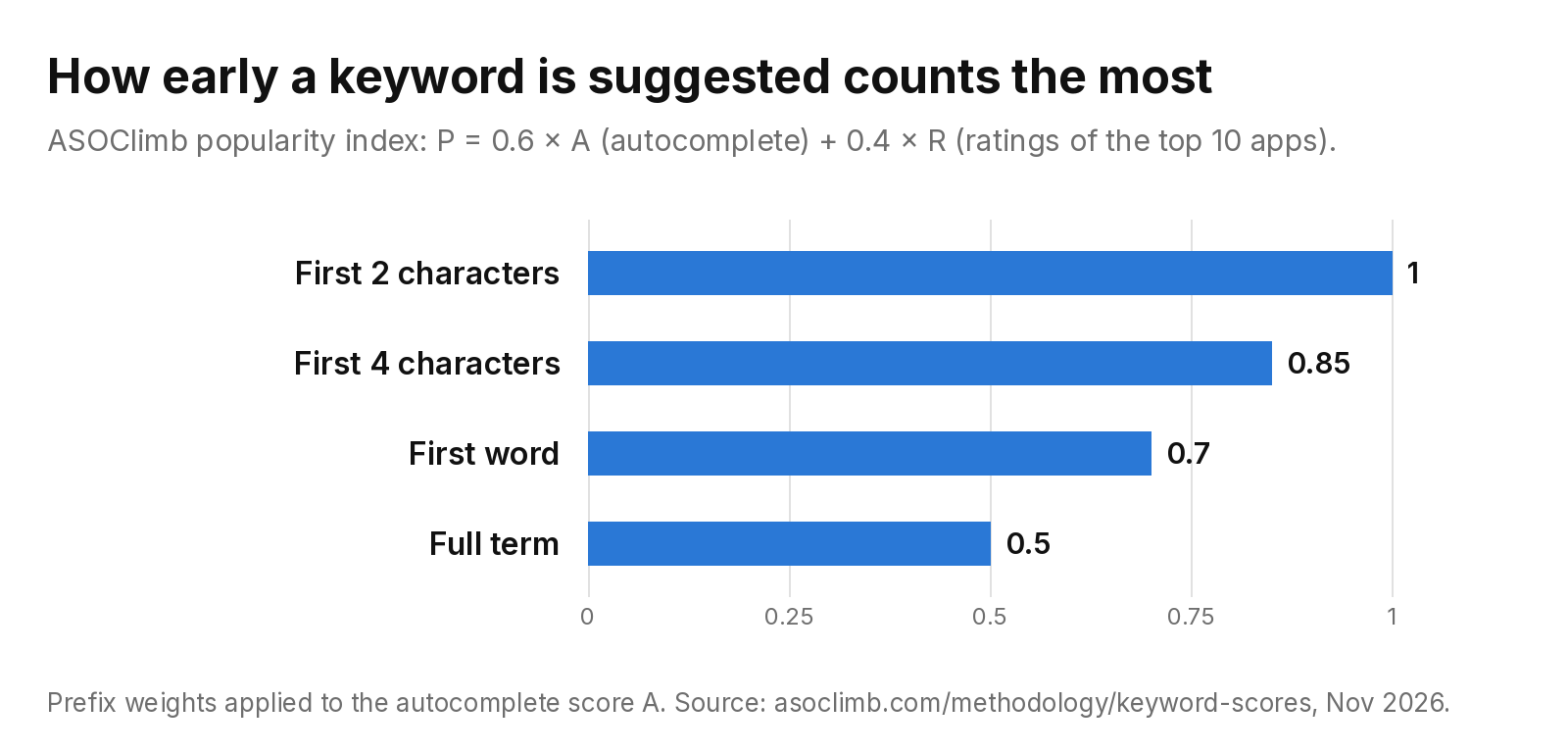
The point of the index is comparison: it tells you which of two keywords has stronger demand evidence in the same store and country. It isn't a forecast of rank, downloads or revenue.
Step-by-step: comparing keywords by demand
Here's a workflow you can run for free, one country at a time.
Step 1: Write down 20 to 40 candidate keywords
Start with how a user would describe the problem your app solves, not how you describe your product. Include short heads ("budget"), two-word phrases ("budget planner"), and longer phrases ("budget planner for couples"). If you need help generating candidates, our keyword research workflow covers sourcing in detail.
Step 2: Pick one store and one country
Demand is per storefront. Don't mix US App Store evidence with UK Google Play evidence in the same list. If you target several countries, repeat the process for each; keyword rankings by country explains why results differ so much between them.
Step 3: Read the autocomplete evidence
Run your list through the free keyword checker, which reads the store's suggestions for each prefix and returns a popularity index per keyword. If you'd rather check by hand, type each keyword into the store on a device set to that country and note the shortest prefix at which it appears.
Step 4: Sort into demand tiers, not exact ranks
Group keywords into rough tiers: strong evidence, some evidence, little or no evidence. Scores a few points apart in any popularity index are noise. Large differences are worth acting on.
Step 5: Put difficulty next to demand
A keyword with strong demand and a wall of apps with hundreds of thousands of ratings is rarely the right first target for a new app. Look at difficulty alongside popularity. Our guide to keyword difficulty explains what drives it. ASOClimb's opportunity score combines the two: popularity multiplied by how much room the current top results leave.
Step 6: Check relevance before you commit
A high-demand keyword that doesn't describe your app will bring visitors who don't convert, which can hurt you. If you have a listing, run a Wow Keywords analysis: it scores relevance against your title, category, description and competitors, and drops any candidate scoring below 40 rather than putting it in a suggested variant.
Step 7: Place keywords where they count
On the App Store, the title (30 characters), subtitle (30 characters) and the hidden keyword field (100 characters) are where keywords are indexed. Put your strongest relevant term in the title, your next ones in the subtitle, and the rest in the keyword field without repeating words. See the App Store keyword field and App Store subtitle guides for the details. On Google Play, the title and descriptions are indexed, so write them for both people and search.
Step 8: Measure, then repeat
After a release, watch your search-sourced page views and downloads in App Store Connect or Play Console, and track your rankings for the keywords you added. Re-check demand evidence every month or two, because seasonal terms rise and fall.
Common mistakes with keyword volume
- Treating any estimate as an exact count. Two tools can show very different "volumes" for the same keyword because they use different models. Compare within one tool, not across tools.
- Ignoring the storefront. A keyword that is popular in the US can be close to absent in Germany, where people search in German.
- Chasing only the biggest heads. The highest-popularity keywords are often brand names or broad terms dominated by large apps. A medium-demand phrase you can rank in the top 10 for usually sends more installs than a huge keyword where you sit on page 20.
- Stuffing keywords for demand alone. Relevance matters for conversion and, on Google Play, the policy on repeated or irrelevant keywords can get a listing rejected.
- Never re-checking. Demand moves. A list you built last year may no longer reflect what people type.
Try it on your own keywords
You can check demand evidence for any App Store or Google Play keyword with the free ASOClimb keyword checker, no card needed. When you want popularity, difficulty, relevance and opportunity scored against your own listing and competitors, run Wow Keywords on ASOClimb. And if you work inside Claude or Grok, the ASOClimb MCP connector lets you run the same checks from a chat.
FAQ
Does Apple publish App Store keyword search volume? No. Apple doesn't publish search counts for App Store keywords. The closest first-party signal is Apple Ads search popularity, shown as 1 to 5 in Apple's interface, which is relative rather than an absolute number of searches.
Does Google publish Google Play keyword search volume? No. Google Ads Keyword Planner covers Google Search, not searches inside the Play Store, and Google doesn't publish Play Store search counts. Every Google Play "volume" figure in a third-party tool is an estimate.
What does a popularity score of 5 mean? On the 5-to-100 version of Apple's search popularity that some tools display, 5 is the bottom of the scale, generally meaning the keyword gets very few searches. In ASOClimb's 0 to 100 popularity index, a low score means the store showed little or no autocomplete evidence for the term and the ranking apps have few ratings.
Can I convert a popularity score into monthly searches? Not reliably. The scales are relative and per storefront, and Apple's popularity scale is exponential. Use scores to rank keywords against each other in the same country and store.
Why do different ASO tools show different volumes for the same keyword? Because each tool uses its own model and inputs. Some use Apple Ads popularity, some use autocomplete, some use panel data or download estimates. Pick one tool and compare keywords within it.
Is the ASOClimb keyword checker free? Yes. The keyword checker is free for App Store and Google Play keywords. The ASOClimb Free plan also includes one full Wow Keywords run a month for one app in up to 3 countries, with no card needed; Pro is $10 a month for 20 runs a month across all countries.