
Most advice about App Store screenshots tells you to fill all ten slots and write a bold caption on every one. I wanted to see what the apps that actually rank do, so I counted the App Store screenshots of every app in the top 10 for 27 US keywords.
The short version: the median app uploads 7, almost half of the apps leave slots empty, and the number of screenshots had almost no link to where an app ranked.
How I collected the App Store screenshots data
I took 27 keywords from ASOClimb's US keyword pages, from small niches like color picker and bird identifier to crowded ones like ai assistant and calorie tracker. Each page lists the apps observed in App Store search for that term. These lists were observed on 23 November 2026.
For every app in each top 10, I pulled its screenshot lists from Apple's public iTunes Search API on 24 November 2026, matching each app by name and developer. Seven slots could not be matched safely, so I left them out.
That gave us:
- 263 top 10 slots across 27 keywords
- 250 different apps, since some apps rank for more than one term
- A count of iPhone screenshots, a count of iPad screenshots, and the shape (portrait or horizontal) of the first iPhone screenshot
There are limits. The API returns one iPhone set per app, so apps with several localized or device specific sets count by the one Apple returns. It does not tell me about app preview videos, captions, or design. And this is a count of what ranks, not a test of what converts.
What Apple says about App Store screenshots
Apple's product page guidance says you can feature up to 10 screenshots, and that the first one to three images appear in search results when there is no app preview, depending on orientation (Apple Developer: Create your product page). The search page says the same thing from the other side: your rating and up to three screenshots or app previews may display in results (Apple Developer: App Store search).
So the first three slots do a different job from slots four to ten. The first three get seen by people who have not tapped your app yet. The rest are for people already on your page.
Apple also asks for at least one screenshot per required device size, with a maximum of 10 per size (App Store Connect Help: Screenshot specifications). On Google Play, phones take between 2 and 8 screenshots, and Google asks you to avoid repeating the same message across your short description, screenshots, feature graphic and video (Play Console Help: Add preview assets).
How many App Store screenshots do top 10 apps upload?
Across all 263 slots, the median app had 7 screenshots and the average was 7.1. Here is the spread:
- 49 slots (19%) used all 10
- 120 slots (46%) used 8 or more
- 115 slots (44%) used 5 to 7
- 28 slots (11%) used 4 or fewer, and one app had just 2
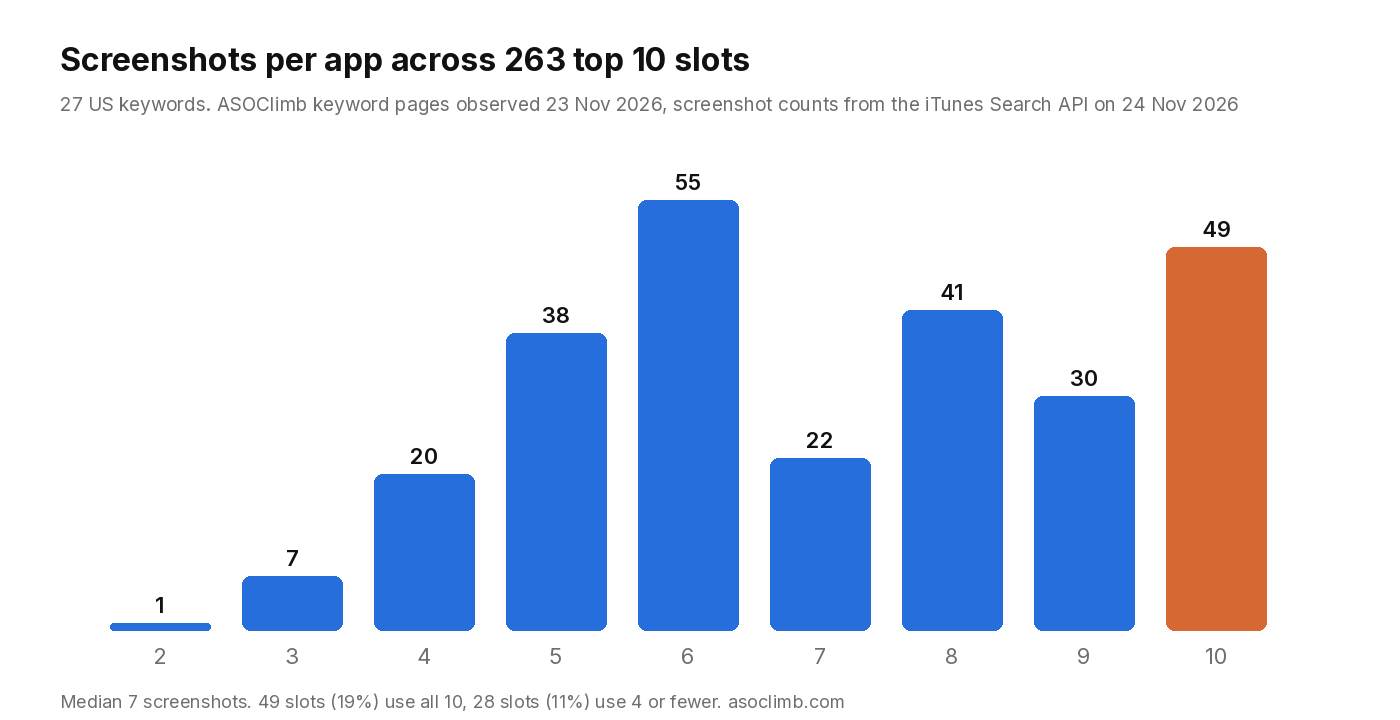
Six was the most common count, with 55 apps. Ten came second with 49. So the most common choice is a full set or close to it, but it is far from universal. If you only have five strong screenshots, you are in the same range as a lot of apps that rank.
Does the number of screenshots decide rank?
Not in this data. The median count by position barely moved: 6 at rank 1, 7.5 at rank 2, and between 6 and 8 for every position after that. Rank 1 had the lowest median of the top five positions.
I also compared every pair of neighbours (rank 1 against 2, 2 against 3, and so on). The higher ranked app had more screenshots in 91 of 231 pairs, which is 39%. It had fewer in 99 pairs (43%) and the same number in 41.
The number one app was also usually below the pack. Of the 26 keywords where I could match the number one app, it had fewer screenshots than its top 10 median in 16, more in 8, and the same in 2. Only 4 number one apps used all 10 slots.
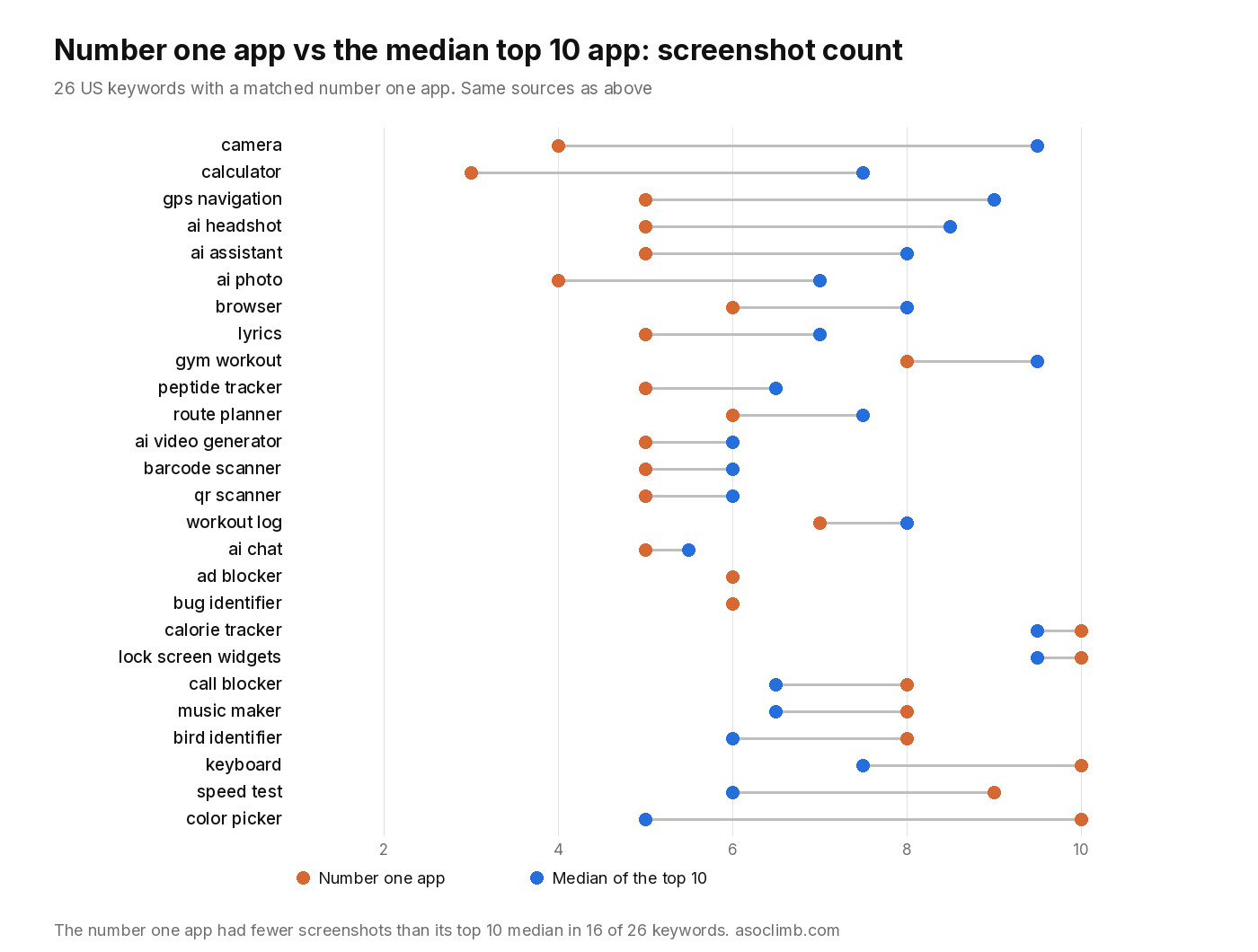
Some examples from the data:
- camera: Apple's own Camera app was number one with 4 screenshots, while the median for that top 10 was 9.5. Dazz Cam (number two) and Blackmagic Camera (number three) had 10 each. You can see the current list on the camera keyword page.
- ai assistant: Grok was number one with 5 screenshots, as few as any app in that top 10. Claude by Anthropic, at number three, had 9.
- color picker: the number one app had 10 screenshots, while the number five app, Color Picker and Converter, had 3. The color picker keyword page shows the full list.
- speed test: Speedtest by Ookla was first with 9 and FAST Speed Test third with 3.
This does not mean fewer screenshots helps you rank. It means the screenshots were not what separated the apps. In a search for "camera", an app called Camera is going to win on text relevance, as we saw in the App Store title length study. Screenshots work on the other side of the funnel, when a person decides whether to tap and install.
Which App Store screenshot sizes and shapes do they use?
Portrait is close to universal. Of 263 apps, 261 opened with a portrait screenshot. The two horizontal exceptions were Blackmagic Camera (number three for camera) and GarageBand (number four for music maker).
iPad is where apps differ. 192 of 263 slots (73%) had iPad screenshots, and 71 had none. Among the top three positions, 62 of 79 slots had an iPad set. The iPad set only matters to people searching on an iPad, so a phone first app can skip it at the start, but it is cheap to add once the iPhone set is done.
If you are making a new set, Apple lists the sizes you need in its screenshot specifications. Work from the largest required iPhone size and check the dimensions in App Store Connect before you export.
A screenshot set plan that fits how people browse
This is how I lay out a set, built around Apple's limit of three screenshots in search results.
- Slot 1 says what the app does, in the words people type. For a bird identifier that is "point at a bird, get the name". Reuse the wording from your title and subtitle so the search result reads as one message.
- Slot 2 shows a finished result. A real looking result screen, filled in, not an empty state.
- Slot 3 answers "why this one and not the app above it?" Look at the app next to you in the list and show the thing it cannot do.
- Slots 4 to 7 are for people who scrolled. One feature each, in the order a new user meets them.
- Slots 8 to 10 only if they earn the slot. A trial or pricing screen, a review quote, or one more use case. A filler screenshot does more harm than an empty slot.
Apple's App Review Guideline 2.3.3 also says screenshots should show the app in use, not just title art, a login page or a splash screen, and App Review looks for more than half of each set to show the app in use (Apple App Review Help: 2.3.3). If your app supports Dark Mode, Apple suggests at least one screenshot that shows it.
Keep captions on the first three readable at the size of a search result. If you cannot read one on a phone held at arm's length, shorten it.
How to test which App Store screenshots convert
Because count and rank were so loosely linked, I would stop guessing and test. Apple's product page optimization lets you try alternate versions of your page with different icons, screenshots and app previews to see which gets the best results (Apple Developer: Create your product page). Google Play has store listing experiments for the same job.
Change one thing per test. A new first screenshot is a clean test. A new first screenshot, a new third one and a new icon at the same time tells you nothing. If you run paid traffic or want a different set per audience, our post on custom product page keywords covers how to match a screenshot set to a search term.
Your rating also sits next to those screenshots in search results, so a weak rating can undo a strong first image. We looked at that in the App Store ratings study. Your description matters for the people who read on, and for Android, the Google Play listing guide covers the Play side.
A quick check for your own keywords
Before I redesign a set, I do this:
- Open the keyword page for your main term in your main storefront. Every storefront is its own list.
- Count the screenshots of the apps in positions 1 to 3. Those are the ones your listing sits next to.
- Look at what each first screenshot promises, and make yours say something different and clearer.
- Check whether any app in the top 10 has 4 or fewer. In 17 of 27 keywords at least one did, so a complete, clear set can beat a thin one even if the thin one ranks higher.
Try it on your own keywords
Every ASOClimb keyword page shows the apps currently ranking, so you can run this check in a minute. To see whether your own listing matches a term, try the free keyword checker, or run Wow Keywords on ASOClimb for popularity and difficulty scores. The Free plan needs no card, and plans are on the pricing page.
FAQ
How many App Store screenshots can I upload? Apple allows up to 10 screenshots per device size, and at least one is required. In our data of 263 top 10 slots, the median was 7 and 19% used all 10.
How many screenshots show in App Store search results? Apple says the first one to three screenshots appear in search results when there is no app preview, depending on image orientation. Put your strongest message in those first three.
Do App Store screenshots affect search ranking? Apple's search page describes ranking in terms of text relevance and user behavior, and treats screenshots as part of the product page shown in results. In our data, the higher ranked app had more screenshots in only 39% of neighbouring pairs, so the count did not explain the order. Screenshots mainly affect whether people tap and install.
Should my first App Store screenshot be portrait or horizontal? Almost every app in our data opened with a portrait screenshot, 261 of 263. The two horizontal exceptions were a camera app and GarageBand. Match the way your app is held.
How many Google Play screenshots do I need? Google Play takes between 2 and 8 phone screenshots, and a minimum of 4 for tablets and Chromebooks if you add large screen images.