
Your App Store description is the longest piece of text on your product page, and it is also the piece most developers spend the least time testing. The App Store description holds up to 4,000 characters, yet Apple's own search page names a shorter list of fields when it explains how results are ranked. So what is the description actually for?
To answer that with data instead of opinion, we looked at the descriptions of 192 apps that ranked in the top 10 on ASOClimb's US keyword pages for 20 keywords. This guide covers what Apple says, what those descriptions look like, and a step by step way to write yours.
What Apple says the App Store description does
Apple's App Store search page says search results are based on a number of factors, including text relevance, which it spells out as "matches for your app's title, subtitle, keywords, and primary category", plus user behavior such as downloads and ratings (Apple Developer: App Store search). The description is not in that list.
Apple's product page guidance then describes the description's job in plain terms: it should "highlight the features and functionality of your app", and Apple adds "Don't add unnecessary keywords to your description in an attempt to improve search results" (Apple Developer: Product page).
Put together, the safe reading is this. Treat the App Store description as copy for people who are already on your page, not as a lever for App Store search rankings. The words that decide whether you appear for a search live in the title, the subtitle, the keyword field and the category. The description's job is conversion: turning a visit into a download.
The App Store description limits
A few hard facts from Apple's App Store Connect reference (platform version information):
- The description is limited to 4,000 characters.
- It should be plain text, with line breaks as needed.
- It appears on your product page and when people install the app, and Apple says it "will be used for web engine search results once you release your app". That is web search, not App Store search.
- Promotional text sits above the description and is up to 170 characters (see Apple's product page guidance).
- You can update the description when you submit a new version of your app.
Because Apple specifies plain text, structure has to come from line breaks, short paragraphs and symbols rather than formatting.
What 192 ranking apps actually write
For the data below, we took the top 10 apps on 20 ASOClimb US App Store keyword pages (observed 11 Nov 2026). That is 200 ranking slots filled by 192 unique apps. We then pulled each app's description from Apple's iTunes Search API on 13 Nov 2026. The 20 keywords range from "camera" and "fitness" to "pill identifier" and "lock screen widgets". Everything here is a count of those descriptions, nothing is modeled.
Length: most apps use well over half the limit
The median description was 2,555 characters, about 64% of the 4,000 limit. At the extremes:
- 47 of 192 apps (24%) used 3,500 characters or more, and 3 sat at 3,999 or 4,000.
- 23 apps (12%) wrote under 1,000 characters, and 6 of those wrote under 500.
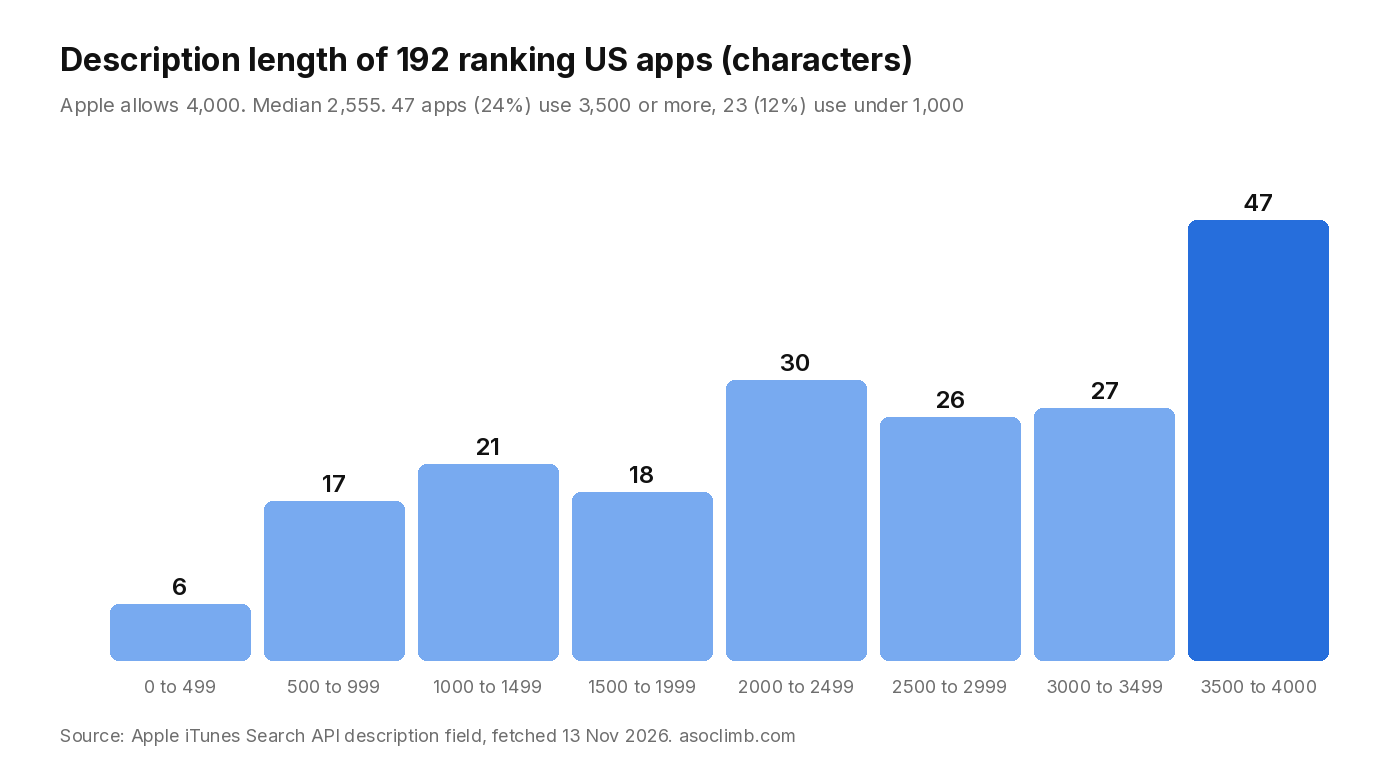
Length alone is not a quality signal. Top 5 slots had a median description of 2,849 characters against 2,365 for ranks 6 to 10, a gap we would not build a strategy on, because rank also reflects ratings, downloads and the fields Apple does index. What the data does show is that a short description is not a barrier to ranking: apps with under 1,000 characters are in these top 10 lists.
Keywords: the description does not separate rank 1 from rank 10
For each of the 200 slots, we checked whether the exact keyword phrase appears in the app name and in the description (a case insensitive match on the whole phrase). The result:
- 120 of 200 slots (60%) had the exact phrase in the description.
- 107 of 200 slots (53.5%) had it in the app name.
- 88 slots had it in both, 19 in the name only, 32 in the description only, and 61 (30.5%) in neither.
Now compare the top of the list with the bottom. In ranks 1 to 5, 60 of 100 descriptions contained the phrase. In ranks 6 to 10, also 60 of 100. If the description were a strong ranking lever, you would expect the apps at the top to use the phrase more often. They did not.
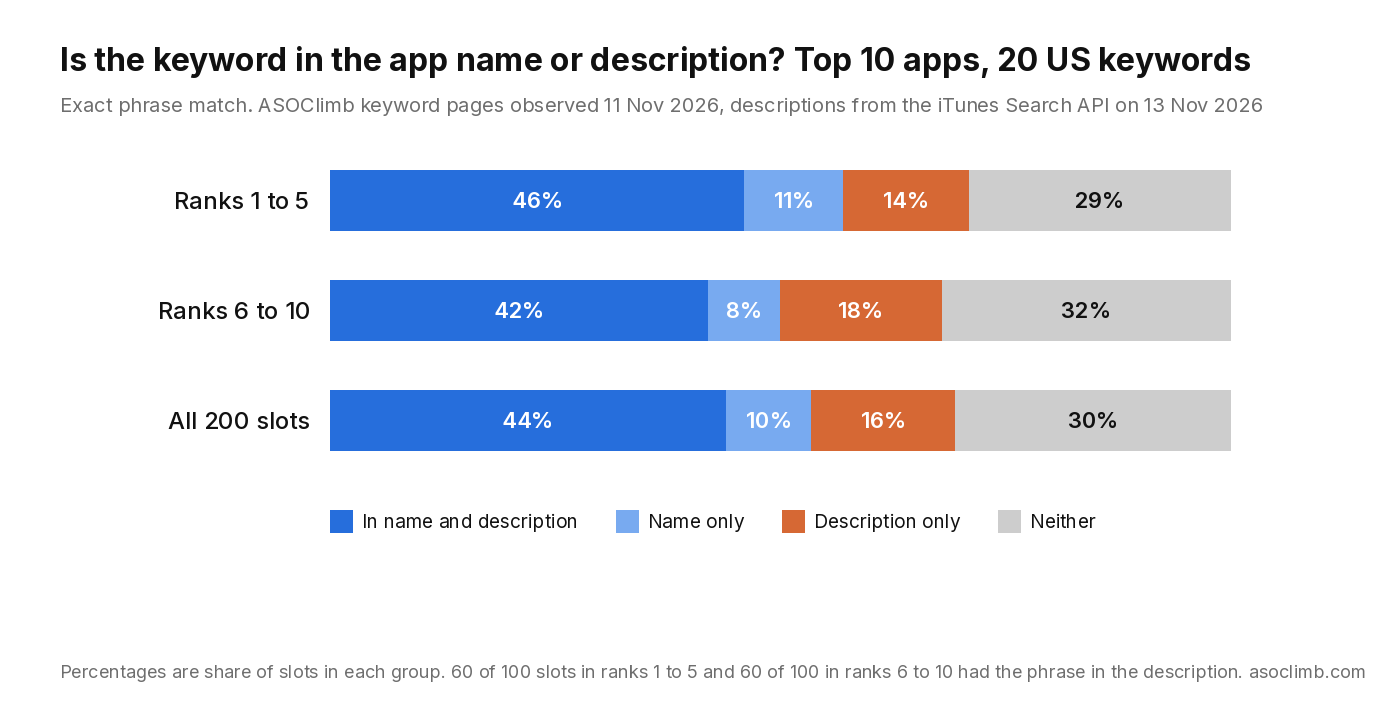
The 61 slots that have the phrase in neither the name nor the description are the most telling. Those apps still rank in the top 10. Their position likely comes from fields the iTunes API does not return, mainly the subtitle and hidden keyword field, plus category, ratings and downloads. That fits Apple's own list of search factors.
A caution on method: this is an exact phrase check. A looser check, where every word of the keyword appears somewhere in the description, matched 146 of 200 slots.
Structure and content: what the descriptions contain
Across the 192 descriptions:
- 149 (78%) use bullet or symbol style lists, such as dots, check marks, stars, or lines that start with a dash or asterisk.
- The median description has 36 line breaks.
- 132 (69%) mention privacy, and 120 (63%) mention terms of use, terms of service or similar.
- 93 (48%) mention subscriptions, and 62 of those describe auto renewal.
- 26 (14%) include a currency amount, even though Apple recommends avoiding specific prices because they may not be accurate in every region.
Legal and subscription text takes up room, and it counts toward the 4,000 characters.
How to write an App Store description, step by step
Here is a workflow that follows Apple's guidance and the patterns above.
Step 1: Write the first sentence for someone who has not scrolled
Apple's product page guidance says the first sentence is the most important because it is what users can read without tapping to read more. Open with what the app does and who it is for, in plain words. Do not open with an award or a slogan.
Step 2: Follow with one concise paragraph, then a short feature list
Apple describes the ideal description as a concise, informative paragraph followed by a short list of main features. Keep each bullet to one benefit. Three to eight bullets is enough for most apps.
Step 3: Use your keywords because they describe the app, not to rank
Take the strongest terms you already placed in your title, subtitle and keyword field and use them naturally where they fit. If you are still choosing those terms, run candidates through the free keyword checker first. Do not repeat a phrase to push it up, since Apple asks you not to add unnecessary keywords to your description.
Step 4: Put accolades and legal notes at the end
Apple recommends putting an accolade at the end of your description or in your promotional text. Subscription terms, privacy and terms links also belong near the bottom, where they do not push the opening away.
Step 5: Keep prices out
Apple advises against specific prices in the description because pricing is already shown on the product page and may differ by region. Describe what is included in each plan instead of the amount.
Step 6: Match the description to the real app
Apple's App Review Guidelines on accurate metadata say your description, screenshots and previews should accurately reflect the core experience of the app (App Review Guidelines). Describe features that exist today. If a feature is behind a subscription, say so.
Step 7: Localize it for each market
If your app is available in several languages, Apple advises localizing the description along with keywords, app previews and screenshots. Writing local copy is a different task from choosing local search terms, which we cover in how to localize App Store keywords.
Step 8: Update it with each release
Apple lets you change the description when you submit a new version. Use that moment to align it with your new release notes, new screenshots and any category change.
What about Google Play?
Google Play handles this differently, and it is worth not copying your iOS description over unchanged. Play Console Help lists a short description of up to 80 characters and a full description of up to 4,000 characters, and it warns that "repetitive or irrelevant keyword usage" in the app name, short description or full description can lead to app suspension (Play Console Help). Our guide to Google Play store listing optimization covers the Play side in more detail.
Common mistakes with the App Store description
- Stuffing keywords. Apple says not to, and the data above shows the apps at the top do not rely on it.
- Burying the opening. Starting with a long list of awards or a wall of text wastes the one part people read without tapping.
- Letting it go stale. Features change, subscription plans change, and the description should follow.
- Expecting a rank jump from a rewrite. Because Apple's text relevance list does not name the description, judge a rewrite by conversion in App Store Connect, not by rank.
Try it on your own keywords
To see which apps you are up against for a term, open any ASOClimb keyword page, such as the color picker keyword page, and read the top 10 descriptions side by side. When you want popularity, difficulty and relevance scored against your own listing, run Wow Keywords on ASOClimb. The Free plan needs no card, and you can compare plans on the pricing page. If you work in Claude or Grok, the ASOClimb MCP connector runs the same checks from a chat.
FAQ
Does the App Store description affect search ranking? Apple's App Store search page lists title, subtitle, keywords and primary category as the text that search relevance is based on, and its product page guidance says not to add unnecessary keywords to your description. Treat the description as conversion copy. In our check of 192 ranking US apps, 60 of 100 slots in ranks 1 to 5 and 60 of 100 in ranks 6 to 10 had the keyword in the description, so it did not separate high from low rankings.
How long can an App Store description be? 4,000 characters, as plain text with line breaks. The median among the 192 apps we checked was 2,555 characters, and 24% used 3,500 or more.
What should the first line of my App Store description say? What the app does and who it is for. Apple says the first sentence is the most important because it is what people can read without tapping to read more.
Can I use bold text in the App Store description? Not as formatting. Apple specifies plain text with line breaks. Use short paragraphs and symbol based bullet lists for structure. Of the 192 descriptions we read, 149 (78%) used bullet or symbol style lists.
Should I put the price in my App Store description? Apple recommends against it, because the price is already on the product page and may not be accurate in every region. 26 of the 192 descriptions we read still included a currency amount.
How often can I change the App Store description? Apple lets you update the description when you submit a new version of your app. Check your own App Store Connect settings for what applies to your app.
Is the Google Play description different? Yes. Google Play has an 80 character short description and a 4,000 character full description, and Google warns that repetitive or irrelevant keywords in the name, short description or full description can lead to suspension.